Why Smart Companies Are Leaving Cloud AI and Running LLMs Locally (The Complete Ollama Playbook for 2026)
Discover 7 powerful reasons smart companies use Local LLMs with Ollama for privacy, lower costs, and full AI control in 2026.
Table of Contents
Introduction: The Quiet Transformation Underway at Serious Companies
Your internal AI assistant processes a confidential editing document.
It summarizes clauses, flags legal risks, and drafts an executive briefing in less than 30 seconds.
Efficient? Absolutely.
Safe? Probably not.
Because that document – which contains financial projections, legal strategies and unpublished M&A details – simply passed through someone else’s server.
Maybe it was OpenAI.
Maybe Anthropic.
Maybe Google.
Most teams don’t even know it.
That is the real problem.
The adoption of AI moved so quickly that companies optimized first for speed and then for governance. Developers embraced APIs because it was easy. Product teams liked the results. Executives liked the demos. No one stopped long enough to ask the uncomfortable question:
Where is our data really going?
Now legal teams are asking.
Security teams are asking.
CISOs are asking.
And increasingly, even the engineers who originally pushed for cloud AI are asking.
Because they have seen the invoice.
They have read the seller’s terms.
They have gone through an audit where someone asks:
“Can you guarantee that no data we own is being retained, logged, or used for training?”
And the honest answer is usually:
No. Absolutely not.
That’s why local LLMs is no longer a hobby experiment.
They have become infrastructure.
And the instrument leading that change is the Ollama.
With Ollama, companies can run powerful models and coding models like Llama, Mistral, Gemma, Quinn, Phi entirely on their own machines.
No API keys.
No per-token billing.
No vendor lock-in.
No need to send sensitive information outside your walls.
This is no longer the norm.
Law firms are doing it.
Hospitals are doing it.
Banks are doing it.
Defense contractors are doing it all the time.
This guide explains exactly why and how.

The Cloud AI Problem That No One Is Talking About Clearly
Let’s be clear.
Cloud AI is not bad.
But for many businesses, it creates three serious problems:
- Privacy risk
- Cost uncertainty
- Reliance on vendors you don’t control
That combination quickly becomes expensive.
Privacy: Feature Not Compliant
Most people assume that “enterprise AI” means secure AI.
That assumption is dangerous.
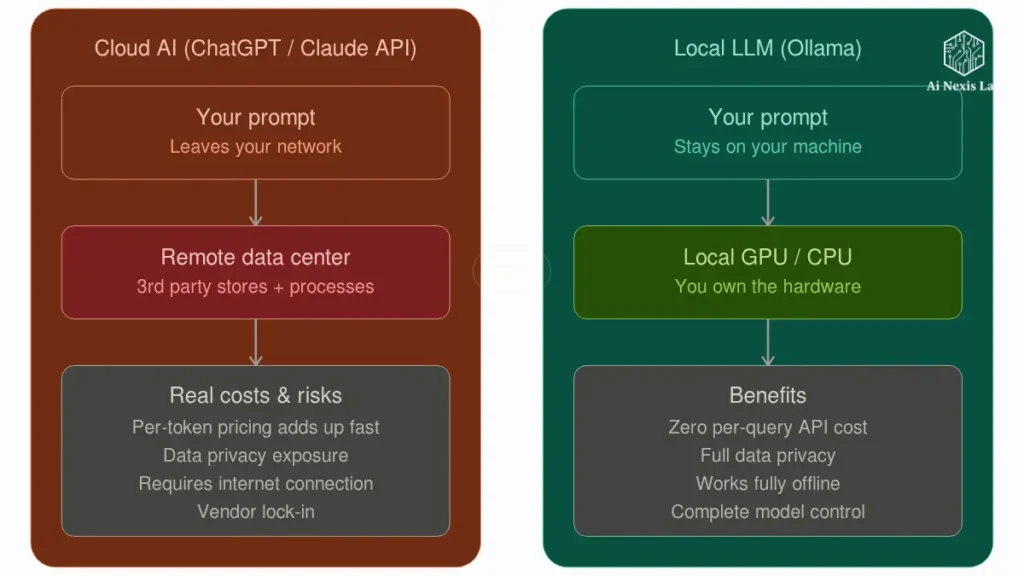
When your prompt goes to the cloud provider, your data leaves your infrastructure.
That’s important.
Real-World Examples Where This Becomes a Problem
Healthcare
A hospital sends patient summaries to a cloud model.
That raises immediate HIPAA concerns.
Even if the provider offers compliance options, many teams are not using the right plan.
They are using developer-level access because it was faster.
This is how mistakes happen.
Legal
A law firm uploads lawsuit documents or drafts of contracts.
Now attorney-client privilege becomes a real issue.
You don’t want opposing counsel asking where your AI summaries were processed.
Financial
A trading desk sends proprietary models, strategy documents, or pre-market analysis to a third-party LLMs.
It’s a regulatory nightmare waiting to happen.
Internal IP
Your source code.
Your product roadmap.
Your pricing strategy.
Your customer agreements.
People forget that these aren’t “just signals.”
They’re business assets.
And most companies treat them like disposable chat inputs.
That’s reckless.
Cost: Invoice Shock Is Real
At first, APIs seem cheap.
A few tokens.
A few thousand tokens.
No problem.
Then usage standards.
Then you have to face reality.
Example
Your inner assistant becomes popular.
20 employees use it every day.
Then 100.
Then the whole company.
Suddenly your “little AI tool” is processing millions – or billions – of tokens monthly.
Now Finance wants to know why your AI bill is bigger than your cloud hosting bill.
And you don’t have a good answer.
Because API pricing is measured in perpetuity.
Hardware isn’t.
That difference matters.
A lot.
Dependency: Your AI Vendor Owns Your Roadmap
This part is constantly overlooked.
If your product relies entirely on third-party APIs, your product depends on their decisions.
Not yours.
That means:
- Overnight price changes
- Model depreciation
- Outages
- Latency spikes
- Output behavior changes without warning
You’ve created a workflow.
They also control whether they work tomorrow or not.
That’s not a strategy.
That is dependency.
What Ollama Really Is (and Why It Changed Everything)
Ollama is basically Docker for LLMs.
That’s the easiest way to explain it.
It makes it stupidly easy to run large language models locally.
You install it.
You run a command.
You have an AI model running on your machine.
Example
ollama run llama3.2That’s it.
No API setup.
No billing accounts.
No SDK complexity.
No cloud dependencies.
Meta’s Llama 3.2 models available through Ollama include lightweight 1B and 3B versions designed for multilingual dialogue and summary tasks.
Ollama also supports larger families such as Llama 3.1 and Llama 3.3, including a 70B-class model for serious enterprise workloads.
That’s where things get interesting.
The OpenAI-Compatible API Trick That Most Teams Miss
This is the part that people underestimate.
Ollama exposes a native REST API that looks like the OpenAI API.
That means many existing tools can switch with minimal code changes.
Same SDK.
Same framework.
Different backend.
End point
http://localhost:11434/v1/chat/completionsIn many cases, changing your base URL is enough.
It’s not a migration.
It’s a redirect.
Big difference.
Step-by-Step Setup Is What Really Matters
Most tutorials make this more complicated.
It’s easier than people think.
Install Ollama
macOS / Linux
curl -fsSL https://ollama.com/install.sh | shWindows
Use the official Ollama installer.
Done.
No drama.
Run Your First Model
ollama run llama3.2It downloads the model, loads it, and drops you into the chat.
Now you are running AI locally.
No internet required after downloading the model.
No usage billing.
No vendor lock-in.
Which Models Really Matter In 2026
Don’t chase the hype.
Choose a model based on workload.
No Twitter threads.
Best General Models
Llama 3.3 70B
Probably the strongest serious open-weight option for many companies.
Meta positions it as a state-of-the-art 3.1B model with performance comparable to the Lama 405B on many tasks.
These executives have noted.
Llama 3.2
Great for lightweight deployments.
Fast.
Efficient.
Good for summarizing, rewriting, and supporting tasks.
Ideal starting point.
Gemma 2
Strong instructional follow-up.
Reliable formatting.
Good for structured output.
Quen
Very strong in logic and coding workflow.
Many serious builders quietly prefer it.
Best Coding Models
Code Llama
Still useful, but no longer the best choice for automatic.
Quen Coder
Often good.
Especially for debugging and code repair.
Most people still don’t understand that.
Hardware Reality Check
People are lying about this online.
Let’s be honest.
You don’t need a datacenter to get started.
Comfortable Starting Points
| Hardware | Good Fit |
|---|---|
| MacBook Pro 16GB | 7B models |
| Mac Studio 32GB+ | 13B–30B |
| RTX 4090 | strong local performance |
| Dual GPU server | serious production |
| CPU only | possible, but slower |
Don’t start with the largest model.
That’s amateurish behavior.
Start with what solves the problem.
Not what looks impressive.
Why Security Teams Prefer Local LLMs
Because “local” really means something.
Prompt lives within your infrastructure.
Prediction stays inside your infrastructure.
Response stays inside your infrastructure.
Nothing leaves.
It changes everything.
Real Security Benefits
Hospitals
Patient data resides within the hospital network.
No third-party transmissions.
Much easier compliance posture.
Law Firms
Contracts never leave internal systems.
Privileges remain secure.
That’s more important than “best benchmark score.”
Financial Institutions
Sensitive strategy documents remain internal.
No regulatory contact due to unnecessary external routing.
Air-Gapped Deployments
This is the part that people forget.
You can completely disconnect the machine after downloading the models.
No internet.
Still works.
That’s impossible with cloud AI.
And for defense, government, and high-security environments, it’s non-negotiable.
Real Cost Comparison (Not Imaginary Spreadsheet Math)
Let’s cut the crap.
People either grossly overestimate API costs or grossly underestimate them.
Here’s the reality.
Small Team
Cloud API is OK.
Maybe even better.
Faster to deploy.
Less operational overhead.
Don’t over-engineer.
Mid-Sized Company
Now the math starts to change.
Multiple internal tools.
Heavy usage.
Daily automation.
Code assistant.
Knowledge discovery.
Document analysis.
Support drafting.
Now API costs stack up.
Fast.
Very fast.
Example
A good local server can cost $10,000–$20,000 up front.
That sounds expensive.
But over 3 years, it often outperforms recurring API costs by a large margin.
Especially when usage is high.
Especially when privacy is important.
Especially when the purchase asks the hard questions.
That’s why companies change.
Not the ideology.
The math.
Four Frameworks That Make Migrations Really Work
Most teams make this mistake because they try to go “all local” right away.
That’s stupid.
Use a strategy.
1. Hybrid Handoff Strategy
Start locally:
- Internal documents
- Code suggestions
- Knowledge retrieval
- Compliance review
Keep in the cloud:
- Public marketing copy
- Low-risk creative work
- Edge cases where model quality is most important
Slow transition.
Not emotionally.
2. Shadow Routing
Run both systems in parallel for 30 days.
Cloud output.
Local output.
Compare results.
Don’t guess.
Measure.
Most teams find that the quality gap is much smaller than they anticipated.
3. Prompt Calibration Loop
Local models are not GPT.
Prompts need tuning.
Budget time for it.
A week spent fixing prompts saves months of frustration.
Skipping this is laziness disguised as speed.
4. Fallback Safety Net
Local system down?
Fall back to the cloud.
But log it.
Make it visible.
Security teams hate invisible exceptions.
And they should.
Fine-Tuning: The Real Strategic Advantage
This is where local models become truly powerful.
Not just cheaper.
Better.
You can fine-tune them privately.
On your data.
Your writing style.
Your contracts.
Your support tickets.
Your codebase.
Your documentation.
It creates something that a cloud API can’t easily give you:
Organizational Intelligence
A model that truly understands your business.
Not general internet knowledge.
Your business.
That’s where the competitive advantage starts.
Not in benchmark screenshots.
Integrating Ollama Into Your Existing Stack
This part is easier than people think.
LangChain + Ollama
Native support exists.
Minimal code changes.
No architectural meltdown required.
Open WebUI
Think of it as your private ChatGPT.
Browser-based.
Self-hosted.
Internal teams prefer it because they don’t need terminal access.
They just want chat.
This gives them that.
Without the privacy mess.
VS Code + Local Coding Assistants
Developers don’t want philosophy.
They want autocomplete.
Tools like Continue + Ollama deliver that.
No code leaves the environment.
That’s important.
Especially for serious engineering teams.
Offline AI: The Use Case Everyone Underestimates
This is bigger than people realize.
Cloud AI assumes the internet.
Reality often doesn’t.
Field Operations
Mining.
Oil.
Remote engineering.
No reliable connectivity.
Still need answers.
Local wins.
Manufacturing
Shop floor troubleshooting.
Maintenance guidance.
Machine diagnostics.
No need for the cloud.
Need reliability.
Defense and Government
This is obvious.
Air-gapped local AI is not optional.
It is essential.
Rural Healthcare
Field hospitals.
Emergency response.
Connectivity-challenged clinics.
Local models become practical infrastructure.
Not experiments.
Limitations You Must Respect
Don’t romanticize local AI.
There are trade-offs.
Real.
Frontier Model Gap
Let’s be honest.
Top cloud models are still strong.
For deep reasoning, complex synthesis, and high-level writing, Frontier Cloud models often win.
Pretending otherwise is fanboy nonsense.
Hardware Maintenance
You have a machine.
That means:
- Failures
- Upgrades
- Monitoring
- Electricity costs
- Deployment management
Freedom comes with responsibility.
Shocking, I know.
Context Windows
Some local models still struggle with large document references.
Election strategy is important.
Architecture is important.
Prompting is important.
You can’t just force everything.
Frequently Asked Questions
Is Ollama really free?
Yes.
Ollama itself is free to use, and most of the models available through it are open-ended models with no per-token cost.
That means there is no monthly usage invoice like with Cloud APIs.
Your real costs are hardware, storage, electricity, and maintenance – not prompt volume.
That’s why the economics become attractive once usage scales.
For hobby use, it seems convenient.
For enterprise use, it becomes financially strategic.
Can local models really compete with ChatGPT?
Depends on the task.
For raw frontier reasoning, the best cloud models still lead.
That’s just reality.
But for internal documentation, coding support, summarization, retrieval, structured output, and company-specific workflows, native models often perform much better than people expect.
Especially after prompt tuning.
And especially after fine-tuning.
People compare “default GPT” to “poorly configured local model” and call it a fair test.
It’s not.
Benchmark properly.
What is the minimum amount of hardware worth buying?
Don’t buy junk hoping for a miracle.
The 16GB Apple Silicon Mac is a practical floor for meaningful domestic use.
It gives you strong performance with 7B-class models.
For teams, the sweet spot is usually:
1) Mac Studio
2) RTX 4090 system
3) Dedicated Linux inference server
It gives enough headroom without becoming an infrastructure theater.
Buying too small is a waste of time.
Buying too big before validation is a waste of money.
Use your brain.
Is local AI automatically GDPR or HIPAA compliant?
No.
And anyone who tells you yes is selling something.
Local inference eliminates a major compliance risk: sending sensitive data to third-party providers.
It helps a lot.
But compliance depends on your entire architecture:
1) Access Control
2) Logging
3) Retention
4) Encryption
5) Governance
6) Internal Policy
7) Local helps.
It doesn’t magically replace legal review.
Your compliance officer still exists for a reason.
Final Verdict: Should You Switch?
Here’s the Honest Answer.
Solo Builders
Use the cloud first.
Move fast.
Validate fast.
Don’t buy servers to feel sophisticated.
It’s startup cosplay.
Growing Companies
If AI spending is increasing by more than a few thousand dollars per month, seriously evaluate local.
Not casually.
Seriously.
Because ROI math happens much faster than most teams expect.
Regulated Industries
Healthcare.
Legal.
Finance.
Defense.
You should be evaluating on-premises already.
This alternative is not for the long term.
It’s becoming table stakes.
The Ultimate Truth
Owning your own AI stack is becoming a strategic advantage.
Not because cloud AI is bad.
Because dependency is expensive.
Because privacy is important.
Because control is important.
Because serious companies eventually stop renting out critical infrastructure.
They own it.
That transformation is already happening.
Quietly.
Fast.
And if you haven’t tested it yet, your next step is simple:
Install Ollama.
Run:
ollama run llama3.2Spend 30 minutes with him.
It will teach you more than 100 opinions that you will never learn.
Everything else starts from there.