13 Claude Command Prefixes That Power Users Actually Use (And Why Most People Are Still Doing Them Wrong)

Discover 13 proven Claude command prefixes that boost productivity, improve decision-making, and unlock advanced AI workflows for real-world results.
Table of Contents
Introduction: You’re Using AI Like Google – and That’s The Problem
Let’s get straight to it.
Most people are wasting AI.
Not because they are stupid. Not because the equipment is weak. But because they are using it like a search engine instead of a decision engine.
You open the Claude, type something like:
- “Give me a summary of this”
- “Write a blog post”
- “Give me ideas”
And yes – you get something useful.
But “useful” is no longer a bar. In 2026, AI is capable of acting as:
- A strategist
- A critic
- A teacher
- A detractor
- A systems thinker
If you’re still getting average output, it’s because you’re giving average instructions.
That’s where command prefixes come in.
They look simple – just a slash before your prompt. But they fundamentally change how the Claude processes your request. Instead of just responding, he adopts a thinking mode.
And that’s the real change:
You’re not asking better questions – you’re pushing for better thinking.
There are 13 main prefixes that power users rely on. Most casual users have never heard of them. The difference in output is not small – it’s night and day.
This is not about tricks. It’s about control.
Let’s break it down.
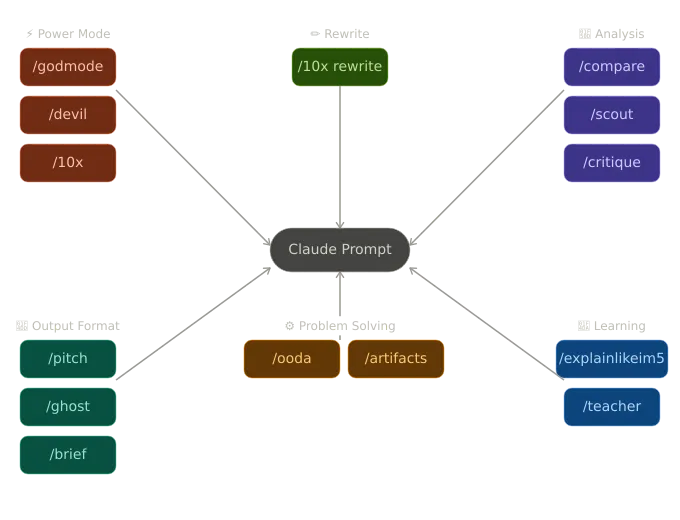
Part 1: What Command Prefixes Really Do (and Why They Work So Well)
Before you start memorizing commands, you need to understand the mechanism. Otherwise, you will use it blindly – and get inconsistent results.
The Claude doesn’t just respond to your words. It responds to:
- Tone
- Purpose
- Structure
- Implicit Expectations
When you type a general prompt, Claude responds by default to:
Balanced, polite, broadly useful
It’s good for general use. But it’s terrible for:
- High-stakes decisions
- Sharp writing
- Critical thinking
- Competitive strategy
Command prefixes override those defaults.
It tells the Claude:
“Don’t just answer – think about it.”
That one change changes everything:
- What it prioritizes
- What it ignores
- How straightforward it is
- How much it challenges you
Think of it like hiring a consultant.
If you say, “Give me advice,” you get general input.
If you say, “Act like a ruthless VC reviewing my startup,” you get something completely different.
Same AI. Different frame.
And framing is everything.
Part 2: Power Mode Commands – When You Need Brutal Clarity, Not Humility
/godmode – Remove the Beauty, Keep the Truth
Let’s clear up a common misconception.
This is not a jailbreak. It does not bypass security.
What it does is remove hesitation.
Default Claude tries to:
- Balance both sides
- Avoid harsh tone
- Include positivity even when unnecessary
It is socially useful. It’s useless when you need accuracy.
/godmode forces you to prioritize:
- Truth over tone
- Clarity over diplomacy
- Suggestion over voice
Example:
A typical prompt:
“Review my business idea”
You’ll get:
- Encouragement
- Mild concerns
- Vague suggestions
With /godmode:
“This model fails because customer acquisition costs will exceed lifetime value within 6 months. Here’s why.”
No padding. No emotional cushion.
You really need this.
Use It When:
- You are evaluating ideas
- You are making financial decisions
- You have doubts or blind spots
- You want real criticism, not validation
If you feel uncomfortable using it, that’s a sign that you probably need it.
/devil – Destroy Your Own Argument Before Someone Else Does
Most people make weak arguments without realizing it.
Why? Because they never test them properly.
They argue against imaginary opponents – not against real opponents.
/devil fixes it.
It forces the Claude to generate the strongest possible counterargument to your position.
Not a weak objection. Not surface-level criticism.
A real, still-many objection.
Example:
You believe:
“Remote work increases productivity”
Run /devil and you might find:
- Collaboration decay analysis
- Long-term innovation risks
- Bias in productivity studies
- Hidden costs in integration
That’s not a negative. That is preparation.
Where people mess up with this:
They use it to attack others.
Wrong move.
Use it on yourself.
This is how you create something that stands up under pressure.
/10x – Stop Polishing. Start Rewriting.
Most people ask AI to “improve” something.
That is a weak instruction.
Improvement = incremental.
/10x forces the change.
Claude:
- Rethinking the structure
- Cut dead weight
- Sharpening messaging
- Increase clarity and impact
Real outcome difference:
- Shorter
- Clearer
- More persuasive
- More intentional
Example:
Your original email:
Polite, wordy, vague CTA
After /10x:
Straightforward, problem-focused, action-based
This is one of the highest ROI commands.
Use it consistently.

Part 3: Analysis Commands – See What You’re Missing
/compare – Stop Thinking Sequentially
Most people compare things like this:
- Read Option A
- Read Option B
- Try to remember both
It’s inefficient and error-prone.
/compare Forces structured thinking:
- Similar criteria
- Side-by-side evaluation
- Clear trade-offs
Use it for:
- Job offers
- Investments
- Tools/platforms
- Strategies
Real value is not the answer – it’s the structure.
It forces clarity on what really matters.
/scout – Find Problems Before They Become Reality
This is one of the most practical commands on this list.
/scout = threat detection.
You are asking:
“What am I missing?”
Not:
“Is this good?”
That is an important difference.
What does it surface:
- Hidden assumptions
- Operational risks
- Unrealistic expectations
- Time issues
- Resource gaps
Example:
Launching a product?
/scout can flag:
- Excessive conversion rate
- Underestimated churn
- Cash flow timing issues
- Dependency risks
This is basically a pre-mortem.
If you skip this step, you are choosing to learn the hard way.
/critique – Not Just What’s Wrong – How To Fix It
Feedback without direction is useless.
/critique forces two things:
- Identify flaws
- Provide concrete improvements
Not vague suggestions. Not “this could be better”.
Real improvements.
Best Use Cases:
- Writing
- Pitch Decks
- Strategy Documents
- Content
If you’re serious about improving quality, this is a non-negotiable.
Part 4: Output Commands – Same Idea, Better Format
/pitch – Say It In 30 Seconds or It’s Not Clear Enough
Most people over-explain.
That’s not intelligence – that’s a lack of clarity.
/pitch forces compression:
- Problem
- Solution
- Difference
Everything else is cut off.
If your idea doesn’t last /pitch, it’s not sharp enough.
/ghost – Make It Sound Human, Not a Template
The default AI writing is:
- Clean
- Organized
- Predictable
That’s why it’s detectable.
/ghost introduces:
- Rhythm variation
- Natural phrasing
- Subtle imperfections
- Personality
Not casual. Not sloppy.
Human.
This is more important than people think – especially:
- Social content
- Blogs
- Personal brand writing
If your content looks like everyone else’s, it won’t stand out.
/brief – Cut The Noise
Sometimes you don’t need:
- Context
- Explanation
- Background
You just need the answer.
/brief gives you:
- 1-2 sentences
- No fluff
- No filler
Use it when speed matters.
Part 5: Learning Commands – Really Understand Things Quickly
/explainlikeim5 – Get the Main Idea Without the BS
This isn’t about making things stupid.
It’s about eliminating unnecessary complexity.
Experts often overcomplicate explanations because:
- They are used to technical language
- They assume background knowledge
/explainlikeim5 Forces:
- Generality-based thinking
- Intuitive understanding
- Clarity over precision
Use it when entering unfamiliar areas.
/teacher – Structured Learning, Not Just Answers
This is different.
/teacher doesn’t just explain – he creates understanding:
- Explanation
- Next questions
- Exercises
- Connections
It is closer to guidance than response.
If you really want to learn – not just consume – then use this.
Part 6: Problem Solving Framework – Think Like a Professional, Not a Guesser
/ooda – Make Decisions Like a Strategist
Most people rush to take action.
That’s why they fail.
The OODA framework pushes:
- Observe
- Orient
- Decide
- Act
The key step is Orient:
How you interpret the information.
Bad decisions usually come from:
- wrong assumptions
- Outdated models
- Incomplete context
This command slows you down enough to think properly.
/artifacts – Build Instead of Talking About Building
This is where things get real.
Instead of:
“How can I make this?”
You’ll get:
“The working version is here.”
Real:
- Tools
- Interface
- Mini Apps
No development team required.
This is a big change:
Non-technical users can now build functional systems.
If you’re not using this, you’re behind.
Part 7: Combining Commands – This Is Where It Gets Serious
A command is useful.
Sequence is powerful.
Stress Testing Stack
- Usually Draft
/devil/scout/critique/10x
This simulates the full professional review cycle.
Most people never do this once.
You can do it in 30 minutes.
Learning Stack
/explainlikeim5/teacher/compare/brief
This creates:
- Understanding
- Depth
- Memory
Communication Stack
- Draft
/critique/ghost/brief
Result:
- Clear
- Human
- Effective
Part 8: What These Commands Are Not
Let’s be clear.
These are not:
- Hidden features
- Hacks
- Intelligence shortcuts
They do not provide new knowledge to the Claude.
They control:
- Focus
- Tone
- Rationale Style
That’s it.
But this is enough to make a dramatic change in output quality.
If you’re not getting good results, the issue isn’t the AI.
It is a notification.
Frequently Asked Questions
Does this command prefix work everywhere?
Yes – but not because they are built-in features.
They work because the claude understands structured instructions. Whether you are using it through chat or the API, these prefixes act as contextual cues.
However, results may vary slightly depending on:
1) Model version
2) Instant clarification
3) Conversation history
If you’re getting inconsistent results, it’s usually your prompt – not the command.
Can these commands override AI limitations?
No.
They do not bypass:
1) Security policies
2) Knowledge constraints
3) Realistic constraints
What they do is change how the claude reacts to those constraints.
For example:
1) /godmode removes hedging
2) But it will not allow restricted content
If you expect this to work like a jailbreak, you are misunderstanding them.
Can I create my own commands?
Yes – and you should.
That’s where the real benefit comes from.
Example:
“/Strategist: Respond like a senior operator scaling a $10 million business”
This works because the claude follows role-based framing.
The 13 commands are just proven shortcuts.
The real power is in customizing them.
How many commands should I use at once?
Keep it tight.
1–2 max per prompt.
More than that creates conflicting instructions.
Example:
/godmode /teacher /brief
That’s messy:
1) Aggressive
2) Educational
3) Concise
Pick the mode that matches your goal.
Will this be important in the future, or is it temporary?
The format may change.
Not the skill.
Understanding:
1) How to direct thought
2) How to structure prompts
3) How to define intention
It’s a lasting benefit.
People who master this now will always get better outputs.
Final Verdict: The Real Advantage Isn’t AI – It’s How You Use It
Here’s an Uncomfortable Truth.
The gap between:
- People get average AI results
- People get high-level output
Not the technology.
It is about thinking.
Most users:
- Write a question
- Accept the answer
- Move on
Power users:
- Define a thinking mode
- Challenge output
- Aggressively improve
- Stack the workflow
That’s the difference.
These 13 commandments are not magic.
That is discipline.
They force you to ask:
“What kind of thinking do I really need right now?”
This question is what puts you ahead of most people.
Start simple:
Use /scout before decisions
Use /ghost for communication
Use /10x for anything important
Then build from there.
Because in 2026 the real edge is not access to AI.
It’s about knowing how to make him think according to your needs.