Your multi-agent system keeps breaking – here’s the orchestration fix most engineers miss
Building your first multi-agent system is exciting. Watching it crash in production? Not so much.
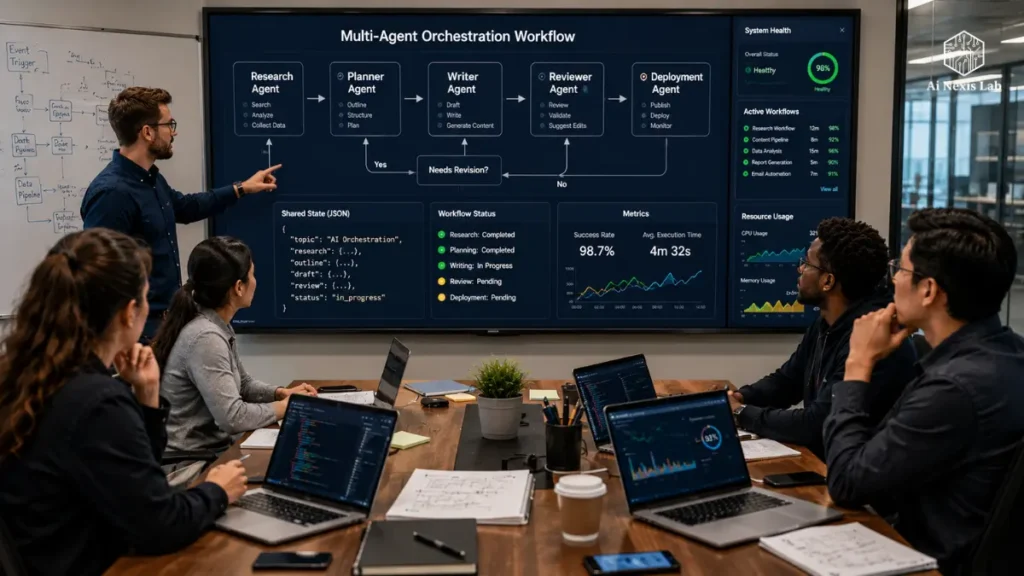
At first, everything seems clean. You have a research agent who collects information, another agent writes the content, perhaps a reviewer checks the quality, and a deployment agent who handles the final step. It feels modular. Organized. Almost elegant.
Then reality appears.
The research agent ends successfully, but the writer never begins. One agent expects structured JSON while the other sends plain text. The workflow stalls indefinitely as two agents wait silently for each other. Hours disappear into the debugging log, only to find a missing field in the shared state object.
If you’ve experienced something like this, you’re not alone.
Surprisingly, these failures are not usually caused by bad prompts or weak language models. Those are architectural problems. As multi-agent systems become more common in production during 2026, orchestration has become as important as the intelligence within each individual agent.
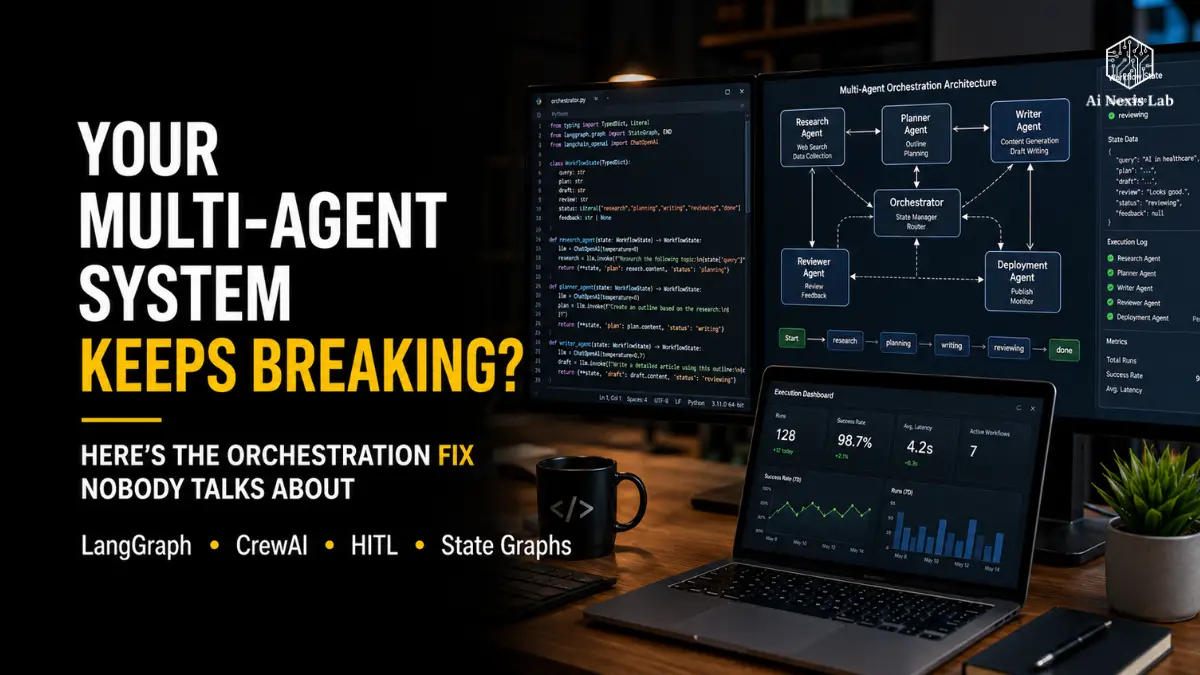
This is where frameworks like LangGraph and CrewAI come in. Instead of treating agents as separate scripts connected by function calls, they provide a structured way to coordinate work, manage state, recover from failures, and involve humans when needed.
This guide walks through ideas that are important when moving beyond really simple demos. We’ll see why traditional pipelines fail, how graph-based orchestration changes the picture, and why spending extra time designing workflow logic up front usually saves a lot more time later.
Table of Contents
The Five Frameworks We’ll Use Throughout This Guide
Instead of jumping straight into code, it helps to have a few mental models.
This framework are not a replacement for documentation. There are practical ways to think through common orchestration problems before they become expensive debugging sessions.
Graph Method™
Goals • Roles • Actions • Paths • Handoffs
A planning framework for designing agent workflows before writing code.
GATE Protocol™
Guard • Approval • Test • Execution
A simple framework for adding trusted human approval checkpoints.
DEAD Stack™
Find • Expose • Audit • Dissolve
A systematic way to troubleshoot deadlocks and agents that are always waiting.
STATE Compass™
Schema • Transitions • Annotations • Tests • Escape Routes
A checklist for designing shared state that remains predictable as workflows grow.
CREW Charter™
Context • Responsibilities • Escalation • Workflow
Role-definition framework that helps CrewAI agents collaborate without stepping on each other’s responsibilities.
These names aren’t magic. Importantly, they force you to think through the architecture before adding more agents to an already fragile workflow.
Why Linear Pipelines Keep Falling Apart
Most developers naturally build multi-agent systems the way they have been building software for years.
Step one is done.
Step two uses the output.
Step three continues the process.
That’s perfectly reasonable for deterministic software. It is much less reliable when autonomous agents are involved.
Here’s why.
Agents do not always respond in the same way, even when given the same instructions. A single execution can produce a detailed JSON object. Another may return a well-written paragraph that contains the same information but in a completely different format.
Now imagine that your writing agent expects a field called research_summary, but the research agent returns summary instead.
Nothing crashes.
Nothing throws a dramatic error.
The workflow simply stops progressing.
Those silent failures are often more difficult to diagnose than obvious exceptions because each individual component appears to be functioning properly.
Another weakness of linear pipelines is recovery.
Imagine a twelve-step workflow where everything works up to the tenth step. Traditional pipelines usually leave you with two bad options:
- Restart the entire workflow from scratch.
- Manually patch the missing data and hope nothing else breaks.
Both options don’t scale well when real customers, production systems, or expensive API calls come into the picture.
Modern orchestration frameworks treat workflows as long-running systems with memory, rather than disposable scripts.
That change changes almost everything.
The Graph Method™: Design Before You Build
A common mistake in multi-agent projects is that developers spend hours completing prompts before deciding how agents should actually cooperate.
The Graph Method helps avoid that trap.
Goals
Define exactly what success looks like.
“Generate content” is too vague.
A better goal might be:
“Create a 2,000-word SEO article with metadata, internal links, citations, and approval status.”
Specific goals make routing decisions much easier later.
Roles
Each agent should have a responsibility.
Overlapping responsibilities usually create duplicate work and inconsistent output.
If both the research agent and the writing agent collect background information, you may eventually wonder which one produced the currently stored version.
That confusion quickly grows.
Actions
List every tool that each agent can access.
Search tools.
Databases.
Code execution.
File systems.
Web browsers.
Giving each agent unrestricted access may seem convenient at first, but it also increases unpredictable behavior. In practice, narrower permissions generally produce a more predictable workflow.
Paths
Workflows rarely follow a perfect path.
Ask yourself:
- What happens if the research comes back incomplete?
- What if the fact check fails?
- Should the workflow automatically retry?
- Should it be paused for human review?
Answering those questions before implementation often prevents messy conditional reasoning later.
Handoffs
This is probably the most overlooked part of agent design.
Each agent should know exactly what data it receives and exactly what it returns.
Treat that handoff like a contract.
Using tools like TypedDict or PyDentic makes it much easier to catch typed schema mismatched output during development rather than production.
LangGraph: Why Stateful Workflows Are More Reliable
LangGraph approaches orchestration differently than traditional pipelines.
Instead of treating workflows as sequences of function calls, it models them as directed graphs.
Each node performs a task.
Each edge determines where execution goes next.
It may seem like a small implementation detail, but it changes how complex systems behave.
Instead of agents calling each other directly, they communicate through shared workflow state.
The researcher updates the state.
The writer reads from the state.
The reviewer updates the status again.
Routing decisions are based on the current state rather than nested if-statements spread throughout your codebase.
It’s easy to monitor the result, easy to debug, and very easy to resume after interruptions.
One feature that turns out to be surprisingly valuable is conditional routing.
Suppose your reviewer has assigned a quality score.
If the draft scores above the threshold, the workflow continues towards publication.
If this does not happen, Graph automatically sends the draft back to the author for revision.
There is no complex orchestration logic inside the agents.
The workflow controls the process.
The agents just do their jobs.
It’s a healthy division of responsibilities.
A Small Detail That Saves Headaches
Chat history is another place where developers accidentally lose information.
Instead of overwriting the message history after each node, add new messages to the shared list.
Having a complete execution trail makes debugging dramatically easier, especially when a workflow involves ten or twenty different agent interactions.
State Compass™: Designing Shared State Without Creating Chaos
Shared state seems simple until many agents start writing it together.
Without clear rules, one agent overwrites another’s output, fields disappear unexpectedly, and debugging becomes a guesswork task.
State Compass helps prevent that.
Schema
Define your shared state before creating an agent.
Each field should have a known type and purpose.
Loose dictionaries can work during experiments, but they become difficult to maintain as projects grow.
Transitions
Not every field behaves the same.
Some values should replace previous values.
Others should be cumulative.
For example:
- A conversation history typically grows over time.
- Draft content often replaces earlier versions.
- Usage statistics may need to be added together.
Making those behaviors clear can avoid subtle mistakes later.
Annotations
Documentation seems tedious until six months have passed.
Adding brief notes explaining which agent owns each field can prevent accidental overwrites and make collaboration much easier.
Tests
Independently test agents before connecting them.
Mock the workflow state.
Verify the expected output.
Check that each returned object matches the agreed schema.
It’s not a glamorous task, but it catches a surprising number of problems before they spread throughout the graph.
Escape Routes
Eventually something will fail.
That’s normal.
How the workflow responds is important.
Include dedicated fault areas and recovery paths instead of assuming every node succeeds.
Grand failures almost always beat quiet failures.
CrewAI: A Different Way to Think About Agent Collaboration
While LangGraph focuses on workflow control, CrewAI focuses on teamwork.
Instead of graphs and state transitions, you create a crew made up of specialized agents.
Each agent has:
- A defined role
- A specific goal
- Assigned tools
- Clear responsibilities
That role-based approach feels more natural for many business workflows.
A content production system is a good example.
One agent does research.
Another writes.
A reviewer checks for quality.
A manager coordinates the overall process.
Instead of manually routing each step, CrewAI allows managers to assign tasks based on each agent’s specialties.
For many teams, it’s easier to understand than to design a complete execution graph from scratch.
CrewAI generally supports two collaboration styles.
Sequential workflow passes work from one specialist to another in a fixed order.
Hierarchical workflows introduce a manager agent that divides complex tasks into smaller tasks and assigns them to workers.
Neither approach is universally better.
Sequential workflows are simpler and easier to predict.
Hierarchical workflows are more flexible but require carefully defined responsibilities. If every worker can perform the same tasks, managers often struggle to determine where the work belongs.
That is why role clarity is so important.
The strongest CrewAI systems are not the ones with the most agents.
They are systems where each agent contributes something unique that no one else is responsible for.
Human-in-the-loop (HITL): The safety Net You Shouldn’t Abandon
Once multi-agent workflows start delivering good results, there’s a temptation to automate everything.
Resist it.
Some actions simply carry too much risk to be delegated entirely. Publishing content, deploying code, sending customer emails, updating product databases, or triggering financial transactions – all of this is subject to final human review.
Think of Human-in-the-Loop (HITL) as a checkpoint, not a speed bump.
Instead of automatically continuing the workflow, the system pauses, maintains its current state, and waits for approval or rejection. That pause during development may seem inconvenient, but it’s a lot cheaper than recovering from a bad deployment or a false public announcement.
GATE Protocol™
The practical approval workflow typically follows four stages.
Guard
Identify every action that could have irreversible consequences.
Those are places where execution should stop automatically.
Approve
Give the reviewer enough context to make an informed decision.
Don’t just show “Approve?” Do not show drafts, deployment plans, database changes, or generated reports. The quality of approval depends on the quality of the information being reviewed.
Test
When possible, run a dry run before running the actual action.
Simulating deployments or validating API payloads often results in many errors without impacting production.
Execute
Workflow should only continue after explicit approval.
One detail that is easy to overlook is persistence. If the system pauses for several hours while waiting for approval, it should not restart from the beginning. The workflow should resume exactly where it left off.
That capability becomes increasingly valuable as workflows grow from three or four steps to dozens.
Debugging Deadlocks Before They Drain Your Budget
One of the most difficult failures to diagnose isn’t a crash.
It is silent.
Agent A terminates.
The logs look normal.
Agent B never starts.
No exceptions are thrown.
Nothing progresses.
Meanwhile, API calls, monitoring services, and infrastructure resources continue to be used.
Most deadlocks occur because downstream agents rely on a state that has never been reached.
Perhaps an agent wrote data to a local variable instead of shared state.
Perhaps a returned field name doesn’t match the schema.
Perhaps a routing condition expects a value that was never created.
Whatever the reason, the workflow is waiting forever.
Dead Stack™
When this happens, avoid randomly changing the prompt or adding retries.
Solve the problem methodically.
Detect
Determine which node has actually stopped progressing.
Timeouts around individual agents make this much easier than searching through thousands of log entries.
Expose
Monitor the entire workflow status.
Many orchestration bugs become apparent once you compare the expected fields with the actual values.
Audit
Verify that each agent returns exactly what the shared schema expects.
A surprisingly common mistake is a small one like returning summary instead of research_summary.
That single mismatch can prevent every downstream condition from triggering.
Dissolve
Design workflows with secure defaults.
Conditional routing should not be based on fields that do not exist.
Fallback values and dedicated recovery nodes allow workflows to continue gracefully instead of waiting forever.
The important lesson is that deadlocks are usually architecture problems – not intelligence problems.
Better orchestration resolves them more reliably than better prompts.
Breaking Circular Dependencies
Circular dependencies deserve special attention because they often seem perfectly logical during design.
Imagine this scenario:
The author wants feedback from a reviewer before completing the article.
The reviewer wants a completed article before reviewing it.
Neither agent is technically wrong.
They are simply waiting for each other.
Eventually the workflow loops indefinitely or reaches the iteration limit.
The clean solution is not to add another retry.
It is redesigning the workflow.
Instead of creating a cycle, introduce an intermediate state.
The author prepares an initial draft.
The reviewer evaluates that draft.
The author creates a revised version based on feedback.
Each iteration becomes a clear loop with a clear exit condition instead of an infinite circle.
A well-designed workflow graph remains directed and predictable.
Whenever you see two agents directly relying on each other, it’s usually a sign that another workflow stage is missing.
LangGraph vs. CrewAI: Which One Should You Choose?
This question comes up all the time.
The honest answer is that they solve different problems.
If your workflow relies on detailed routing logic, persistent state, conditional branches, retries, recovery paths, and long-running execution, LangGraph typically provides more control.
That extra flexibility comes with added complexity, but it’s often worth it for production systems.
CrewAI takes a different approach.
Its strength lies in role definition and collaboration.
For research teams, content production pipelines, report generation, customer support workflows, or internal assistants, organizing experts into crews often feels more intuitive than designing graphs from scratch.
Neither framework completely replaces the other.
In fact, many engineering teams now employ them.
CrewAI handles agent responsibilities.
LangGraph manages workflow execution and state.
That combination provides both structured collaboration and reliable orchestration.
Product Checklist: What Separates Demos From Real Systems
A demo only works once.
Production software has to keep working after thousands of executions.
That difference changes your priorities.
Use Durable Persistence
Memory-based checkpoints are suitable for experimentation.
Production systems benefit from persistent storage such as SQLite, PostgreSQL, or Redis-supported checkpointing.
If the server crashes halfway through execution, the workflow should be restarted instead of restarting.
Track Token Usage
Long-running workflows can become surprisingly expensive.
Research loops, repeated retries, or iterative planning can cause agents to use many more tokens than expected.
Track cumulative usage across workflows and define spending limits before costs become surprises.
Invest in Observability
Good logs are helpful.
Complete workflow traces are even better.
Modern tracing tools make it possible to monitor every state transition, every model call, and every routing decision.
When something breaks, you’ll spend less time guessing and more time fixing the actual problem.
Build Idempotent Agents
A practical rule saves countless headaches:
An agent should produce the same result when executed twice with the same input.
It makes retries safe.
Instead of directly changing the shared state, return a new updated state object each time.
Predictability beats cleverness.
A Real-World Multi-Agent Content Workflow
Imagine you are running a content operation that publishes SEO articles every day.
A practical workflow might look like this:
Step 1: The keyword research agent analyzes search intent, competitors, and ranking opportunities.
Step 2: The content strategist creates an outline, heading structure, and publishing requirements.
Step 3: The writing agent generates a full draft.
Step 4: An SEO reviewer evaluates metadata, heading structure, readability, internal linking, and optimization quality.
If the quality score is high enough, the workflow moves on to human review.
If not, the draft returns to the author with specific revision requests.
After approval, the publishing agent formats the article and sends it to CMS as a draft.
Consider something important.
No single agent tries to do everything.
Each participant has a clear responsibility.
That separation simplifies debugging, reduces duplicate work, and allows individual components to be improved without redesigning the entire workflow.
As workflows become more sophisticated, clarity generally becomes more important than adding additional agents.
Final Verdict
Most multi-agent failures have surprisingly common causes.
The problem is usually not that the models are not capable enough.
It is that there is a lack of coordination in the workflow.
Linear pipelines struggle because they assume that each step behaves predictably. Real agents do not. They branch, retry, pause, fail, recover, and occasionally produce output that no one expected.
Frameworks like LangGraph and CrewAI address those challenges from different angles. One emphasizes workflow orchestration and shared state. The other emphasizes specialized roles and collaboration. The choice between them depends less on popularity and more on what type of system you are building.
If there’s one lesson worth taking to your next project, it’s this:
Design the workflow before designing the prompt.
Define your state plan. Determine how agents communicate. Add recovery paths. Include approval checkpoints for risky actions. Test routing logic with mock data before introducing real models.
Those basics won’t eliminate every edge case, but they will prevent many of the most time-consuming failures in production.
Frequently Asked Questions
Is LangGraph better than CrewAI for enterprise AI applications?
It depends on the level of workflow control you need. LangGraph works best when applications require persistent state, conditional routing, retries, checkpointing, and complex execution logic.
Adopting CrewAI is often easier when your workflow revolves around clearly defined expert roles.
Many production systems combine both rather than choosing just one.
How do you prevent deadlock in a multi-agent workflow?
Start with a strict shared state schema and validate each agent’s output before passing control downstream.
Add timeout limits, fallback routes, and default values for routing conditions.
Most deadlocks occur because the expected state was never written or does not match the expected structure of the workflow.
When should you add human-in-the-loop approval?
Use HITL whenever an agent performs actions that cannot be easily undone.
Publishing content, using infrastructure, modifying customer records, or initiating a payment are common examples.
Human review causes some delay, but it significantly reduces operational risk.
Can multiple AI agents safely share the same memory?
Yes, but only when that shared memory has a clearly defined schema and ownership rules.
Decide which agents can update specific fields and how conflicts are resolved.
Without governance, shared memory quickly becomes inconsistent as workflows grow.
What is the biggest mistake developers make when building a multi-agent system?
Many teams focus on the prompt before the architecture.
Whenever problems appear they create more agents instead of improving the orchestration.
In practice, better workflow design usually produces greater reliability benefits than adding additional specialized agents.