RAG 2.0: Why Your Vector Database Isn’t Enough Anymore (And What Really Works in 2026)
Your RAG pipeline went through every demo. The stakeholders applauded. Then you sent it out, real users typed in real questions, and it started building things with confidence.
Sound familiar?
Here’s the uncomfortable truth someone put forth about your “production-ready AI system” in a LinkedIn post: Cosine similarity search on its own will never get you there.
You embedded some PDFs, dumped them into a vector database, and called it retrieval-enhanced generation. It worked in 2024. It was, to be fair, a prototype. In 2026, it’s close to liability – the kind that shows up in a postmortem when your support bot tells a customer their refund was approved when it wasn’t.
I want to be specific about what’s actually broken, because “RAG doesn’t work” is lazy and wrong. Half of the pipeline is fine. GPT-5.4, Cloud, Gemini – these models are smart enough to reason on anything you give them. Failure is not intelligence. It’s information.
If your retriever pulls up three irrelevant paragraphs and buries one sentence that actually answers the question, the smartest model on Earth will still be confused – because you never gave it a fighting chance.
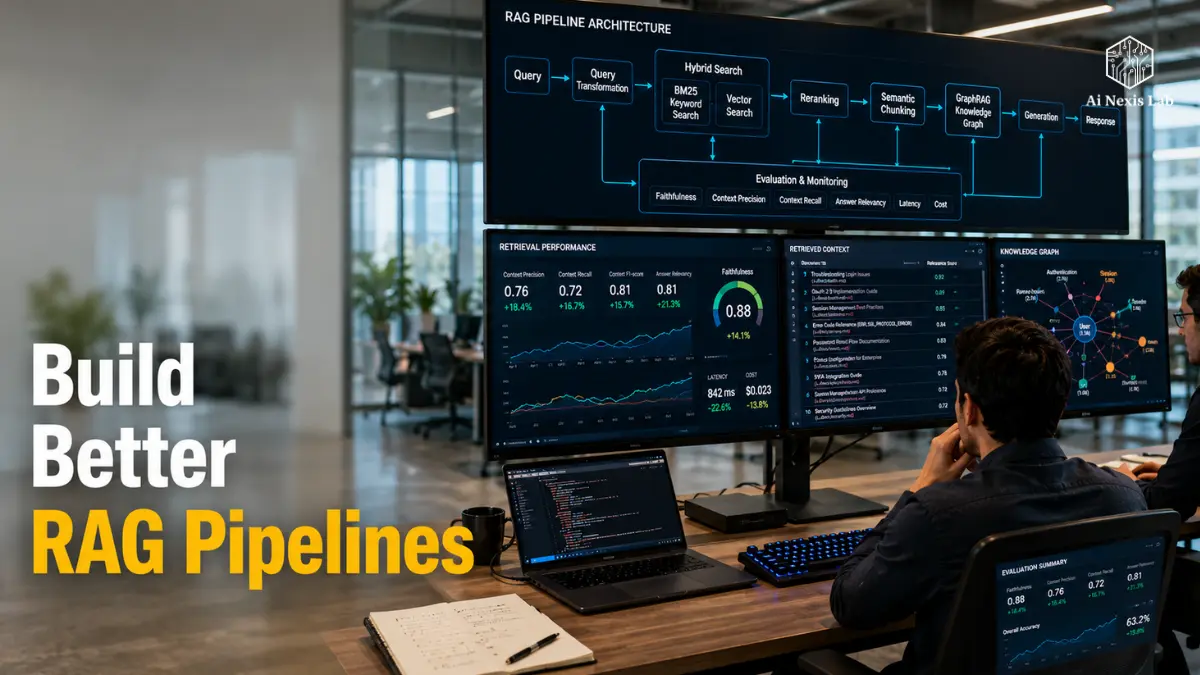
Industry benchmarks support this in a way that makes you feel a little uneasy. The naive RAG – the version most teams still run – answers about 44% of the real questions correctly. Add in the levels I’m about to take you through, and that number goes up to over 63%. It is not a marginal change.
This is the difference between the chatbots people trust and the ones they screenshot for Twitter.
So this article is not another “What is RAG” explainer. You already know what RAG is; That’s why you’re here.
This is the retrieval-quality stack that separates a weekend hackathon project from something you actually let touch production data – hybrid search, reranking, smart chunking, knowledge graphs for questions that vector search literally can’t answer, and a way to measure whether any of it is working.
Along the way I’ll give you a framework that I use to keep the entire pipeline honest, plus some diagnostic tricks to find where your recovery is bleeding accuracy. Let’s get into it.
Table of Contents
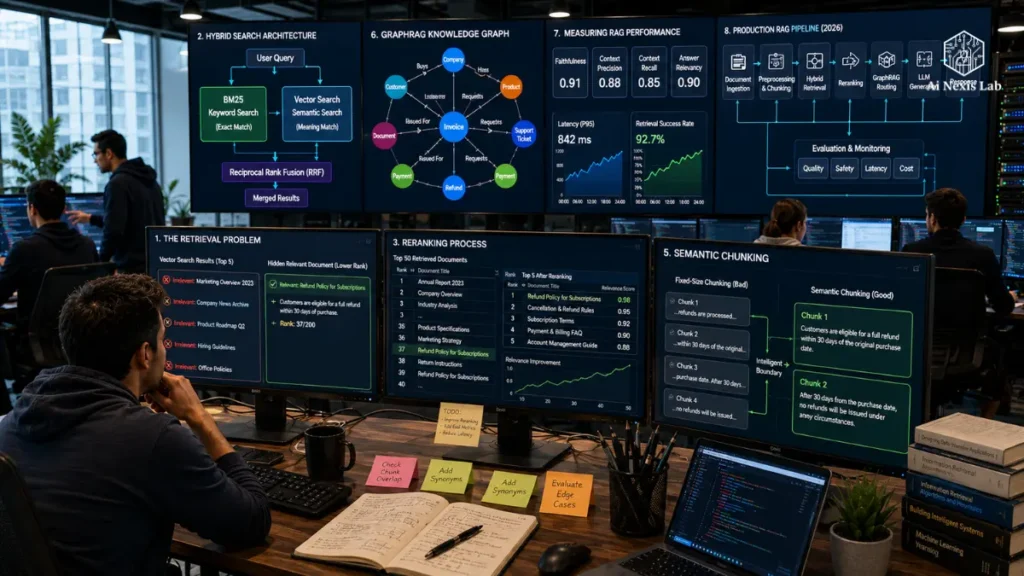
1. Recovery Crisis: “Why It Works In The Demo” Doesn’t Mean It Works
Every naive RAG pipeline follows the same skeleton: cut the documents, embed them, run a cosine similarity search, assign the top few results to the LLM.
It’s simple, it’s quick to build, and it has a hard ceiling that most teams don’t hit until they’re in production.
The main problem is that dense vector embedding is lossy by design. A 1,500-word support document is compressed into a point in a few-thousand-dimensional space.
It throws out contraction details – specific product codes, rare proper names, specific numbers.
Tell your RAG system to look for a chunk that mentions the error code ERR_SSL_PROTOCOL_ERROR or SKU WX-4200, and pure vector search won’t know what to do with it. It knows “meaning.” It doesn’t know “the exact string.”
Then there is the “lost in the middle” problem.
When your retriever gets the right chunk, even if it’s buried in the 40th position out of the 50 candidates you modeled, LLM tends to surpass it.
Larger context windows didn’t fix this – they just gave you more space to bury the answer.
Insider tip: Before you touch a single line of recovery code, create a “golden set” of 50-100 real questions with known correct answers taken from your own content.
You can’t improve what you refuse to measure, and vibes aren’t a metric.
2. Hybrid Search: Stop Choosing Between Meaning and Precision
This is the single most beneficial change you can make to a naive pipeline, full stop. If you do nothing else in this article, do this.
Hybrid search runs two retrieval methods in parallel instead of choosing one.
Dense vector search handles semantic similarity – it will match “How do I fix login problems” against a piece about OAuth session timeouts, even though the words don’t overlap.
Sparse keyword search (BM25, the decades-old ranking algorithm search engines still rely on) handles exact matches – names, IDs, vocabulary, anything where the literal string is more important than the vibe.
Neither wins in every query type. Benchmarks on the WANDS e-commerce dataset essentially tie pure BM25 and pure vector search on relevance – but a properly tuned hybrid setup lags behind by about 7% on standard ranking metrics. That gap grows into thousands of queries every day.
The fusion step is where people get it wrong. You can’t just average the BM25 score and the cosine similarity score – they are on completely different scales and have different meanings.
The solution to this problem is reciprocal rank fusion (RRF), which eliminates raw scores entirely and instead works separately by rank position: first place, second place, third place, regardless of which method produced them.
RRF uses a smoothing constant (traditionally 60) so that the top hit from one method does not automatically steamroll the middle-ranked result from another.
It requires almost no tuning, which is why it has become the default in Weaviate, Elasticsearch, and most modern vector databases.
If you are on Pinecone, note that you will need a separate keyword index – OpenSearch or Typesense – and merge the two result sets in your application layer, as Pinecone does not natively fuse BM25 and vectors the way Weaviate or Qdrant do.
Common pitfall: Treating Hybrid Search as “Set and Forget”
Teams implement RRF once, see an increase in retrieval quality, and stop tuning. But your BM25 index requires the same maintenance as any keyword search system – synonym lists, stop-word tuning, and periodic re-indexing as your content vocabulary changes.
A hybrid pipeline that was good six months ago quietly deteriorates if no one is watching it.
3. Reranking: The Highest ROI Level No One Gives Up Twice
Here’s the pattern that has become the production standard:
Rerank broadly, then narrow down ruthlessly. Pull the top 50-100 candidates with hybrid search – cheap, fast, inaccurate.
Then run the second-stage model, the cross-encoder, which scores each query-document pair jointly instead of comparing pre-computed embeddings.
The difference between a bi-encoder (what powers your vector search) and a cross-encoder (what powers what reorders) is more important than the terminology suggests.
A bi-encoder embeds your query and your documents separately, then compares points in space – fast, but imprecise. The cross-encoder looks at the query and candidate document together, in a single forward pass, and produces a consistency score per pair.
It’s dramatically more accurate and dramatically slower, which is why you never run it against your full corpus – only against a shortlist hybrid search already narrowed down for you.
The increase in accuracy is not subtle. On logic-heavy benchmark queries, reranking has been shown to push relevance scores from roughly 0.13 to 0.40 – a threefold improvement over reranking the same candidates, without gaining anything new.
On a more general RAGAS-based assessment, teams consistently report 15-30% quality improvement after adding the reranking stage.
For model selection:
The Coher Rerank and Voyage Rerank models sit near the top of most current leaderboards, with the new version of Voyage notable for its long context handling.
If budget is a constraint, the open-source ms-marco-MiniLM cross-encoder runs in less than 50 milliseconds on the CPU with zero API overhead – less accurate, English-only, but really robust for a prototype or internal tool.
Insider tip: Don’t rerank more than you need to. The rule of thumb that is accepted in most production teams is to retrieve ~20, re-rank to 5, and give the model 3-5 final shares. Re-ranking 100+ candidates rarely pays off in latency – the signal stays at the head of the distribution, not buried in candidate 87.
4. Chunking Is Not a Solution to Any Problem (And Fixed-Size Splitting Is Costing You Accuracy)
Let me be clear: if you are still splitting documents into fixed 500-character blocks with fixed overlap, you are capping your retrieval quality before a single query can run.
Semantic chunking is a more defensible default in 2026. Instead of counting characters, you count the embedding sentence by sentence and watch for the moment when the cosine distance between adjacent sentences jumps – that’s a thematic shift, and that’s where you cut.
The result is chunks that are actually coherent, self-contained ideas rather than arbitrary character counts that can cut a sentence in half.
For structured content – documentation, code, anything with clear boundaries – structure-aware splitting beats semantic chunking on both cost and reliability: split on headings for documents, split per function or class for code.
Another pattern worth adopting is parent-child recovery.
You index small, granular child chunks (about 100 tokens) because small chunks match queries with surgical precision.
But when a child chunk is hit, you don’t give that small piece to the LLM – you pull the entire parent section or page from the metadata store and give it to the model instead.
You get the matching precision of a small chunk and the contextual richness of a large one, without having to choose one at the expense of the other.
5. GraphRAG: When Your Question Requires More Than One Document
Hybrid search and reordering improves precision and recall for questions with a clear answer that sits in one or two chunks.
They don’t fix multi-hop questions – the kind where the answer requires connecting facts in documents that never directly refer to each other.
“What are the risks in our China-made products, and how do they compare to our European suppliers?” It’s not a discovery.
It is a logic chain across manufacturers, geography, risk categories, and comparison logic, spread across potentially hundreds of documents.
Vector similarity alone cannot do this – there is no single embedding that represents “the relationship between these twelve entities.”
GraphRAG solves this by building a real knowledge graph from your corpus: extracting relationships between entities and LLMs, clustering them into communities (Microsoft’s implementation uses a graph clustering algorithm called Leiden), and summarizing each community at multiple levels of resolution.
When a global or multi-hop query occurs, the system reasons on the community summary instead of chasing the nearest-neighbor chunk.
The performance case for the right query type is strong. Independent benchmarks have put GraphRAG at around 80% accuracy versus 50% for standard RAG on complex, multi-document queries.
In a medical research context, a graph-based system has been reported to achieve over 94% accuracy on multi-hop reasoning tasks against a knowledge base of 1.6 million relational edges, compared to approximately 50% for a comparable non-graph baseline.
The catch – and it’s real – is the price.
Microsoft’s original GraphRAG implementation reportedly cost over $30,000 to index large funds, making it a research toy for most teams, not an infrastructure decision.
New lightweight variants such as LightRAG and LazyGraphRAG have dramatically reduced those costs, in some cases by orders of magnitude, while retaining most of the multi-hop accuracy benefits.
Common Pitfall: Using GraphRAG for Everything
GraphRAG is actually worse than plain vector search for simple real lookups – “what’s the CEO’s name” doesn’t require a graph traversal, and forcing it through one just adds latency to nothing.
The 2026 consensus pattern is not “replace vector search with graphs”. It’s routing: simple point-lookups go to hybrid vector search, multi-hop and thematic queries are routed over graphs.
Query classification, not a single retrieval method, is the actual architecture.
6. Introducing the FETCH Stack™: A Framework for Putting It All Together Without Losing Your Mind
By this point you have five different techniques – Hybrid Retrieval, Reranking, Chunking Strategy, Graph Traversal, Evaluation. How bolting them together turns pipelines into unmaintainable spaghetti. I created the FETCH Stack™ as a mental model that I use to keep the whole thing organized and auditable, and it maps cleanly to everything above:
F – Fuse. Run dense vector search and sparse BM25 search in parallel, merge with reciprocal rank fusion. This is your foundational level, and it is non-negotiable – implement it before anything else on this list.
E – Evaluate. Cross-encoder reranker scores your top candidates combined with the query and narrows down a broad shortlist to a handful of shares that really matter.
T – Traverse. For multi-hop or thematic queries, route to the graph layer rather than forcing another vector search to do something it structurally cannot do.
C – Calibrate. Query transformation sits right before retrieval begins – rewriting a vague or multi-turn query into something your retriever can actually work with, and routing it (vector, graph, or both) based on what type of query it is.
H – Hard. Continuous evaluation against the golden dataset, using metrics that catch regressions before your users do.
The point of naming it isn’t the acronym – it’s that each layer targets a specific failure mode, and you can debug them independently.
Remember failures? Those are levels F and C. Precision failures? Those are levels E. Multi-hop failures? You stop guessing which part of a five-stage pipeline is broken and start diagnosing it like an engineer instead of starting over from scratch every time the answer appears wrong.
7. Query Transformation: Fixing the Query Before It Hits the Database
Users don’t ask clean queries. They ask “what will happen to the other one” three messages into the conversation, or they bury the real intent under filler words that your retriever has no use for.
Query transformation is a step that most naive pipelines skip entirely, and it’s often cheaper than it seems.
Simply put, this means using a smaller, faster model to rewrite the incoming query before retrieval – removing pronouns from previous turns, expanding abbreviations, splitting the compound question into sub-questions that are retrieved separately and merged.
Agentic RAG takes this further: instead of a single retrieve-then-generate pass, the system asks itself, “Do I really have enough to answer this? Is what I found relevant? Should I reformulate and search again?” That loop costs an extra model call, but it catches the class of failures where your first recovery attempt simply misses, and a naive pipeline will respond faithfully using whatever garbage it finds.
Insider tip: Don’t run a query transformation on every single query – that’s latency and an expense you don’t always need.
Route it conditionally: Leave single-turn, ambiguous questions to direct retrieval; Multi-turn or ambiguous questions are rewritten first.
8. Measuring It All: RAGAS and Why “It Feels Good” Isn’t Evidence
You’ve created five levels of recovery sophistication.
How do you really know if they are working? This is where most teams get quiet, because “the answers look better” is not a metric you can put in front of an engineering lead.
RAGAS (Recovery Augmented Generation Assessment) gives you four numbers that cover the entire pipeline:
Fidelity – Does the generated answer actually stick to what was retrieved, or does the model look for details? Aim for above 0.9.
Answer Relevance – Does the answer actually address what was asked? Target above 0.85.
Contextual Accuracy – How much of what you found was actually relevant? Target above 0.8.
Contextual Recall – Did the retrieval find everything relevant, or did it miss important parts?
Here’s the diagnostic logic that makes RAGAS really useful, instead of just another dashboard: If Faithfulness is low, don’t touch the LLM prompt first – fix the recovery.
In most cases, delusion is not a model of finding facts from nothing. It is the model that does its best with the incorrect or irrelevant context you give it.
Chasing a fallacy in your prompt when the real bug is in your recovery is how teams spend three sprints solving the wrong problem.
Create a golden set of 50-100 question-answer pairs from your real domain, run RAGAS before and after each pipeline change, and track trends as your corpus grows over time.
It’s a diagnostic instrument, not a vanity score – a reference accuracy of 0.79 means that 79% of what you fed the model was relevant, not that 79% of your users got the answer right.
Use it to answer “Did this change help or hurt,” not “We’re done.”
9. Do You Need RAG Even With Million-Token Context Windows?
I’ll say this directly because someone in your organization is going to ask it.
Frontier models now handle context windows in the millions of tokens, and the reflex – “fill everything in the prompt, skip retrieval entirely” – is wrong for three separate, tedious, obscure reasons.
Cost: A million-token prompt costs an order of magnitude more per query than a 5,000-token RAG prompt, even accounting for prompt caching discounts.
At any real query volume, that gap becomes the majority line item on your inference bill.
Latency: Time-to-first-token scales with how much processing you are asking the model to do before it starts generating. Bloated prompts mean your users wait longer for the first word of each response.
Attention quality: The needle-in-a-haystack benchmark looks great on paper, but recall on subtle, multi-document reasoning tasks still measurably declines as prompt size increases. A large context window is not all that reliable attention is.
The pattern that actually holds: RAG retrieves, corrects the long reference. Use retrieval to narrow down millions of documents to a handful of important ones, then let the large context window comfortably hold that narrowed set along with conversation history. They are complementary, not competitive.
Diagnostic Toolkit: Three Techniques for Finding Where Your Pipeline is Broken
Building a FETCH Stack™ is one thing. Knowing which level is actually failing when a user reports a bad answer is another matter.
Here are three quick techniques I use to try to recover bugs before touching any code – think of this as a troubleshooting checklist, not a rebuild.
Rank Autopsy. When an answer is wrong, don’t guess – pull the raw ordered list your retriever returned before touching reorder.
Was there a true part at all, just a lower ranked one? It’s a reordering problem, and it’s cheap to fix (tune your reorderer or top-k). Is the correct part completely missing? That’s a recall problem, and it points to your hybrid fusion or your chunking strategy, not your reranker.
This single check tells you which half of the pipeline to blame within a minute.
Needle Audit. Take a question that you know the answer to, and for which you know the source document is long.
Manually check where the responding sentence occurs in the retrieved context. Position 1 out of 5? Great.
Position 4 out of 5 just before the model starts to get attention? It’s a “lost in the middle” feature, and the solution is usually tightening your top-k calculation, not adding more context.
Query Twin Test. Write two versions of the same question – one sentence the way a real user would type it, one sentence the way your source documents are actually written.
Run both through recovery and compare the results.
A large gap between the two tells you that your query and your corpus speak different dialects, and that the same query exists to close the transformation.
None of this requires new infrastructure. Instead of giving them ten minutes and just staring at the final answer and guessing,
Frequently Asked Questions
Do I need hybrid search if my vector database is already giving good results?
Almost certainly yes, if your users ever search for product codes, error IDs, names, or domain-specific vocabulary.
Pure vector search has no mechanism for exact-matching words – it’s not that it does this badly, it’s that semantically-collapsible embeddings cannot structurally represent literal string matches.
If your corpus is pure prose with no identifiers, the gap decreases, but for most enterprise and support use cases, hybrid search is the single biggest quality lever you have.
Is reranking worth adding extra latency?
In almost every production use case, yes – the latency cost is typically milliseconds when you’re re-ranking a shortlist of 20-100 candidates rather than your entire pool (which would be the wrong place to apply it anyway).
The accuracy benefit, especially on logic-heavy questions, is so great that skipping this step usually results in teams making a mistake only once.
When should I actually build a knowledge graph instead of just tuning my vector search?
When your users regularly ask multi-hop or “connect the dots across documents” questions, and when you’ve already tried hybrid search plus reranking and you’re still missing answers that require connecting multiple entities together.
Don’t use GraphRAG as a first step – it’s actually more expensive to build and maintain, and it underperforms plain retrieval on simple lookups.
What is the highest ROI change I can make to the current simple RAG pipeline?
Hybrid search, without much competition.
It requires no additional model calls, works with the recovery framework most teams already have, and the accuracy lift is consistent across almost every benchmark and use case.
If you can only implement one thing from this entire article, implement reciprocal rank fusion between BM25 and your existing vector search.
How do I know if my RAG problem is a recovery problem or a generation problem?
Run the Rank Autopsy from the diagnostic toolkit above, and check your RAGAS Faithfulness Score.
If Faithfulness is low, the model is generating content that is not supported by what it has found – and in most real-world cases, that recovery follows from assigning weak or irrelevant context to the model, not from the model finding unwanted facts.
Fix the recovery first; That is the more common root cause by a large margin.
Final Verdict
The naive RAG was a reasonable place to start in 2024. It’s not a reasonable place to be in 2026.
The difference between “a demo that worked once” and “a system your users actually trust” is made up almost entirely of the layers in this article: fuse your retrieval methods instead of choosing one, mercilessly reorder before it reaches the model, partition by purpose instead of arbitrary character counts, reach for graphs only when the question really requires one, and measure every change instead of trusting your gut.
None of this is strange research anymore. Hybrid search and reordering is an afternoon of implementation work on top of the infrastructure most teams already have running.
GraphRAG and full agentic query routing are big investments, and they should be – save them for multi-hop queries that are really costing your user trust, not for every query that comes through the door.
If you are still running a naive pipeline, don’t try to build all five layers of the FETCH Stack™ in a single sprint.
Start with the fuse. Measure it with a ruler. Then move down the list one level at a time, checking your RAGAS scores after each change so you know exactly what is causing the complexity and what is not.
Where is your pipeline currently really breaking down – recall, precision, or multi-hop logic? Leave it in the comments, and I’ll point you to the exact level you need to build next.