Windsurf vs Cursor: Which AI IDE Really Wins the Vibe Coding Era in 2026?
Windsurf vs Cursor in 2026 explained. Discover which AI IDE truly wins the Vibe Coding era with real tests, agentic workflows, and developer insight
By 2026, something fundamental has changed in software development.
The job title may still be Senior Software Engineer, but the day-to-day reality looks much different than it did two years ago. We no longer spend all afternoon debugging syntax errors, renaming variables, or wiring up the same boilerplate for the hundredth time.
Instead, we are doing something new.
We are thinking in terms of systems. We are shaping the purpose. We are protecting the flow.
Welcome to the era of Vibe Coding.
If you’ve followed the thinking of people like Andrzej Karpathi or lurked in late-night discussions on Hacker News, you’ve probably seen the same theme emerge over and over again:
Coding is becoming less about keystrokes and more about direction.
In this new world, two AI-first IDEs have emerged as clear leaders:
- Cursor, a pure incumbent that turned Visual Studio Code into an AI-powered exosuit
- Windsurf, a bold challenger to Codium that is working hard towards fully agentic development
Over the past few months, I have used both daily. Real projects. Realistic deadlines. Real messes.
What comes next is not marketing fluff or a feature checklist. It’s a grounded, practical look at what IDEs really feel right in the Vibe coding era – and why that feeling is more important than ever.
1. What “Vibe Coding” Really Means (Beyond Memes)
Before comparing tools, it’s worth slowing down and naming the change we’re going through.
A few years ago, AI in coding meant autocomplete and Stack Overflow-style answers. Useful, to be sure—but fundamentally reactive.
Then came pair programming. You ask, it answers. Helpful, but still a back-and-forth conversation.
By 2026, we have crossed the second line.
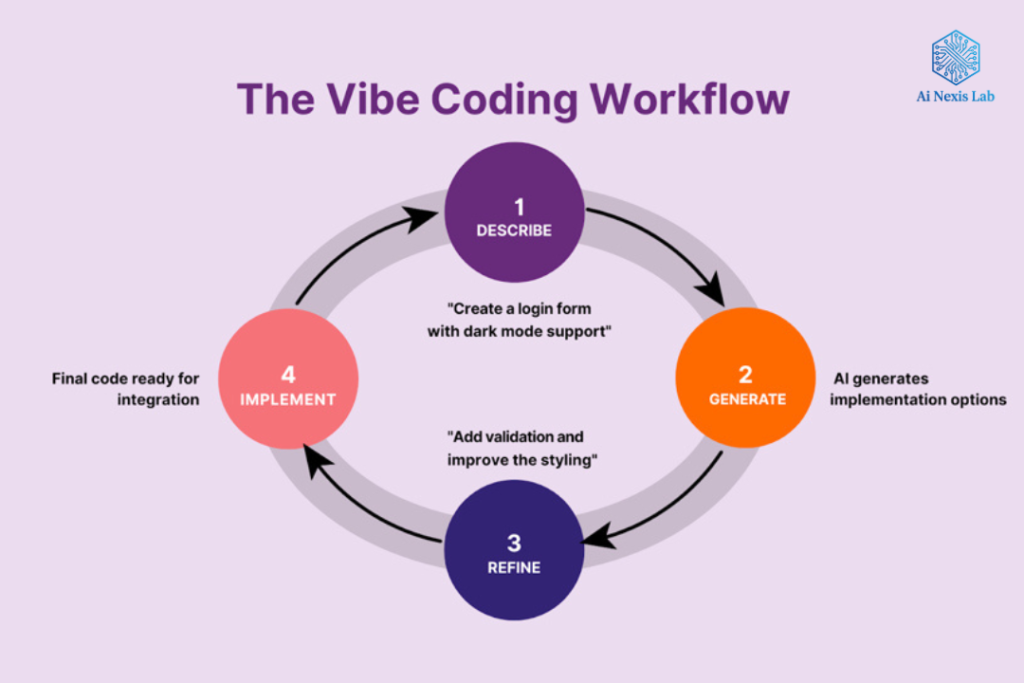
Vibe Coding is the recognition that natural language is now a legitimate programming interface. Not for snippets, but for intent.
Think about the difference:
- Old workflow:
“Write a React hook that retrieves data from this endpoint with retries.”
- Vibe Workflow:
“This page should feel as responsive as Stripe’s dashboard. It should survive data refreshes, and there’s something about the mobile navigation that feels laggy—fix that.”
It is not another notification code. It’s direction.
And a vibe-ready IDE has to do three things well:
- Understand the context (your entire codebase, not just one file)
- Reason about the goal (what you’re trying to achieve, not just what you typed)
- Work independently (without being asked to paste logs or copy errors)
This is the lens through which Windsurf and Cursor need to be judged.
2. The two philosophies behind the cursor and the windsurf
On the surface, the two tools look similar. They are both VS Code forks. It integrates high-level models from providers like both OpenAI and Anthropic. They both promise to make you faster.
However, underneath, their philosophies are very different.
Cursor: AI as a Precision Tool
The core belief of Cursor is simple: keep the developer firmly in control.
It enhances the classic IDE experience with incredibly polished AI features:
- Near-sighted autocomplete
- Precise multi-file edits
- Fast, predictable responses
The cursor doesn’t try to take over your workflow. It enhances it. You’re still the driver. The AI sits in the passenger seat, ready when you ask.
Windsurf: AI as a Collaborator
Windsurf comes from a different place.
Codium didn’t just want better autocomplete. They wanted to re-think the IDE as an agentic environment. Something that can observe, make decisions, and act without waiting for permission at every step.
The defining idea of windsurfing is flow. AI is not a tool you call your own. It’s already there, keeping an eye on your files, your terminal, your errors, and your project structure.
This philosophical divide explains almost every difference you will encounter when using these tools.
3. Composer vs Cascade: The Real Battleground
If there is one place where this comparison is decided, it is here.
Cursor Composer: Controlled Power
The composer is the signature feature of Cursor. Press the shortcut, describe what you want, and the cursor proposes changes to multiple files.
What it does exceptionally well:
- Follows instructions exactly
- Only touches the files it needs to
- Makes changes easy to review and reason about
Composer feels like working with a highly capable junior developer who never makes changes without being asked.
That’s a compliment—especially on a production codebase.
But there’s a trade-off: the composer waits for you. It won’t explore. It won’t investigate. He won’t fix minor problems unless you tell him to.
Windsurfing Cascade: Autonomous Flow
Cascade… sounds different.
You don’t just ask him to change things. You give it a problem, and it does the work.
A typical cascade session might look like this:
- It scans your repo to find relevant files
- Notes failed tests or runtime errors
- Runs commands in the terminal
- Applies fixes
- Looks at and fixes another error
All without you having to copy or forward the logs.
It’s not perfect – but when it works, it’s truly amazing.
Cascade feels less like giving instructions and more like saying,
“Hey, this is broken,”
and watching someone competent calmly fix it.
Vibe Verdict
For pure vibe coding – staying in the flow, avoiding context switching – Windsurf has the edge. Autonomy matters more than precision when you’re trying to secure creative momentum.
4. Context Awareness: Who Actually Understands Your Project?
Context is the silent killer of AI productivity.
Nothing breaks the spell faster than hearing:
“Can you paste the file?”
or
“I don’t see that element.”
Cursor Reference Model
Cursors rely on local embedding and retrieval. It’s fast, efficient, and great for:
- Understanding individual files
- Answering targeted questions
- Making local changes
On small projects, it feels immediate and reliable.
On large, messy codebases? Sometimes it loses the thread. You can feel it zooming in when you need it to.
Windsurf’s Deep Context and MCP
Windsurf relies heavily on deep indexing and the Model Context Protocol (MCP).
This is more important than it seems.
MCP lets Windsurf pull in external context—not just code:
- Project documents
- Tickets
- Design notes
- Linked Knowledge Systems too
In practice, this means that Windsurf often understands why a feature exists, not just how it is implemented.
On large monorepos, that difference is noticeable.
Context Verdict
This is a draw—but with nuance.
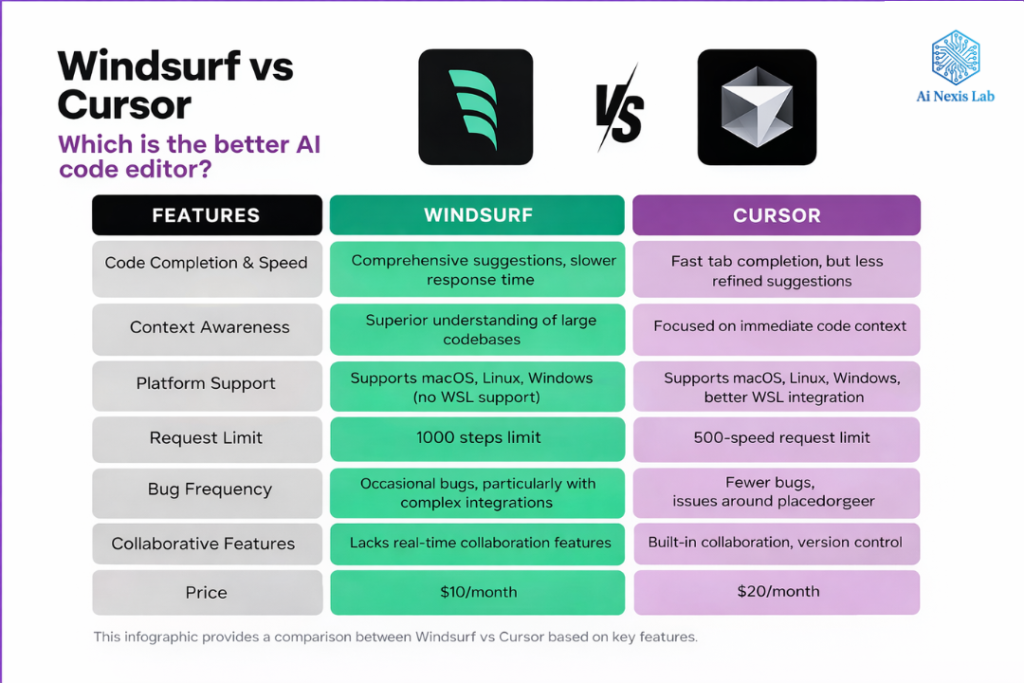
- Small to medium projects: Cursor feels fast and clean
- Large, long-running systems: Windsurf feels more aware and grounded
5. Debugging: Where Agentic IDE shines
Debugging is where the vibe either survives—or dies.
Cursor’s Debug Flow
Cursor helps you debug, but it expects participation:
- You run the command
- You see the error
- You bring the error back to the composer
It works. It’s logical. It’s also a context switch.
Windsurf’s debug flow
Windsurf looks for errors the moment they appear.
If the dev server crashes, Cascade is already reading the stack trace. If a lint rule fails, it knows before you even ask.
Often, by the time you’re ready to complain, it’s already fixing the problem.
This is one of the most obvious examples of agentic value in daily work.
6. UI, Polish and “Feel”
This is more important than people admit.
Cursor’s UX
The cursor is simple. It’s clean. It’s quiet.
Everything feels intentional. The autocomplete (“tab”) system is still the best in the industry – it doesn’t just complete lines, it completes ideas.
If you care about minimalism and responsiveness, the cursor looks premium.
Windsurf’s UX
Windsurf is powerful, but more busy.
Between the cascade log, terminal awareness, and agent response, there’s more happening on the screen. Some developers like that visibility. Others find it distracting.
This is less about right or wrong and more about nature.
7. Price and Practical Value in 2026
Both tools now hover around the same monthly cost, around $20.
The difference is how you spend that value.
- Cursor provides prediction and polish
- Windsurf provides autonomy and a generous free tier
Due to Codium’s infrastructure, latency can sometimes favor Windsurf as well.
8. Choosing the right tool for your vibe
This is not about declaring a universal winner.
It’s about alignment.
Choose Windsurf if:
- You want AI to take the initiative
- You work on large or messy systems
- Debugging uses up your energy
- You think in architecture first, implementation later
Your vibe:
“I set the direction. AI handles the execution.”
Choose Cursor if:
- You value control and precision
- You care a lot about UI polish
- You love writing code, just fast
- You want AI assistance, not AI autonomy
Your vibe:
“I’m still coding – just with superpowers.”
9. The Bigger Picture: Where IDEs Are Headed
The real story isn’t Windsurf versus Cursor.
This is: The IDE is becoming a thoughtful partner.
As MCP matures and moves beyond reference code, the tools that win won’t be the ones with the biggest models – they’ll be the ones that best understand the intent.
Right now, Windsurf is pushing that boundary even harder. Cursor is refining the craft.
And honestly? Using both is the most realistic answer.
Frequently Asked Questions: Windsurf vs Cursor in 2026
Q1: Is Windsurf replacing developers?
No. It replaces busywork, not decision-making. You still decide what to build and why.
Q2: Is the cursor lagging?
Not at all. Cursor is evolving more cautiously, but its polish and autocomplete remain industry-leading.
Q3: Which is better for beginners?
Cursor. Controlled, predictable workflows are less cumbersome.
Q4: Which is better for enterprise teams?
Windsurf, especially on large codebases where references are fragmented.
Q5: Can I use both?
Absolutely—and many developers already do.
Q6: Will VS Code itself handle this?
Eventually, but forks move faster. That’s the reality of innovation cycles.
Final thought
Coding vibe isn’t about laziness. It’s about leverage.
The best developers in 2026 aren’t typing fast – they’re thinking high-level ideas and letting AI handle the rest.
It looks like an AI polished exosuit (cursor) or a capable partner (windsurf) is depending on you.
Choose a tool that keeps your flow safe.
That is the real victory.