
Mobile App Development for Beginners: The Ultimate and Most Essential Guide to Building Apps in 2025

Mobile app development in 2025 will rely heavily on modern tooling, rapid build pipelines, and cross-platform functionality. The ecosystem has matured significantly, providing developers with a stable UI framework, cloud-backed backend services, and advanced debugging tools.
Mobile app development has become one of the most in-demand skills in today’s digital world. Whether you’re planning to build your first app or exploring how apps shape everyday life, this guide will walk you through the entire process – in a simple and practical way.
A clean, useful overview of how mobile apps are actually built.
What is Mobile App Development?
Simply put, mobile app development is the process of designing, building, and maintaining applications for smartphones and tablets. These applications can be anything:
- Banking Apps
- Shopping Apps
- Fitness Trackers
- Social Media
- Games
- Business Tools
If you’ve ever thought, “There should be an app for this,” then you already understand why mobile development exists.
Why Mobile App Development Still Matters in 2025
We live in a world where your phone unlocks your car, orders your food, and tracks your heart rate while you binge-watch Netflix. Apps have become such a natural part of life that people rarely notice how much they rely on them.
But here’s the catch:
Users today expect apps to be fast, intuitive, beautiful, and smart – all at the same time.
What if an app takes more than three seconds to load?
People uninstall it.
What if a button is even a little confusing?
They complain.
What if the app loses data once?
They never trust him again.
That’s why mobile app development in 2025 is no longer just about “app coding”.
It’s about creating an experience – a habit – a digital companion.
And beginners who understand this mindset automatically create better apps.
How app development actually starts
Good apps don’t start with coding.
They start by understanding users.
Developers usually start with:
- Identifying the real problem
- Researching competitors
- Defining features
- Sketching rough UI ideas
- Choosing the right technology
This early planning step saves months of confusion.
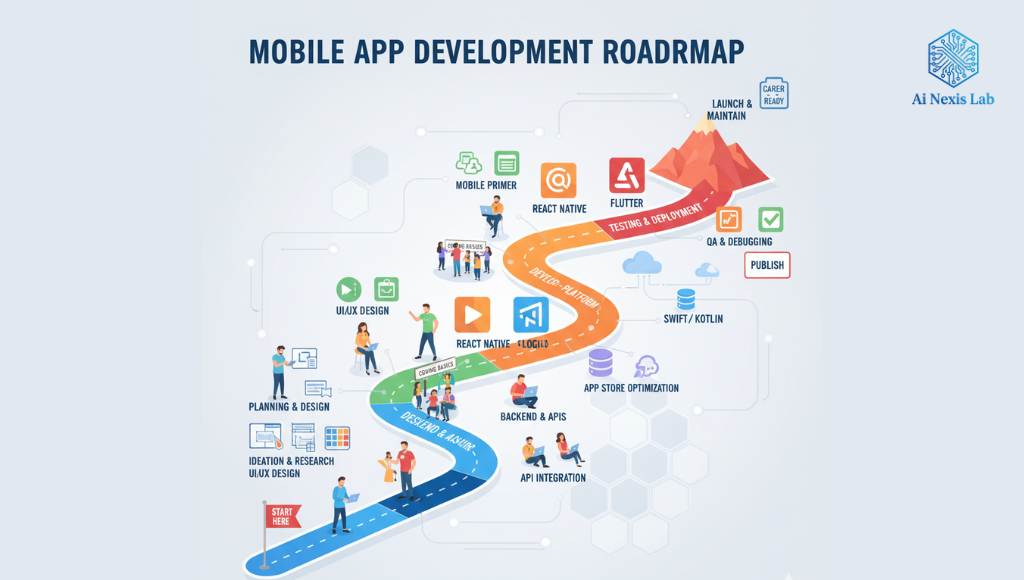
Choosing between native, cross-platform, and no-code
There are many ways to create a mobile app today:
1. Native development (Android + iOS) – (Best for performance)
You create separate applications using:
Why choose Swadeshi?
- fastest performance
- best animations
- deep hardware access
- perfect for professional or large-scale apps
Who uses the native language?
Banks, social media giants, fitness wearables, streaming apps.
Downside?
Two separate codebases. Double the effort.
2. Cross-platform (Flutter, React Native) – (Best for beginners + startups)
Main players:
- Flutter (Dart) — Google’s framework
- React Native (JavaScript/TS) — Meta’s framework
Why choose cross-platform?
- Build once → Run on both Android and iOS
- Large community
- Cost-effective
- Fast development
- Excellent UI
- Suitable for MVPs
Flutter apps look modern and simple.
React Native integrates well with web tech.
This is the sweet spot for most beginners in 2025.
3. No-Code / Low-Code Tools – (Fastest way to prototype)
Tools such as:
This allows you to drag and drop the screen and quickly send apps.
Suitable for:
- Non-Tech Founders
- Validating Ideas
- Building Small Internal Tools
- Simple Directory or Content Apps
But they have limitations in scalability and performance. Best for beginners or quick prototyping.
Key components of a modern mobile app
Typical applications include:
1. Architectural Pattern
Modern applications follow structured patterns such as MVVM, MVI, or Clean Architecture to ensure modularity and testability.
2. Cross-platform development
- Flutter (Dart): Strong performance, unified UI across platforms, large component ecosystem.
- React Native (JavaScript/TypeScript): Flexible, large community, easy API integration.
3. Basic development
- Android: Kotlin + Jetpack Compose for declarative UI
- iOS: Swift + SwiftUI for reactive layout
Both platforms now prioritize declarative UI approaches.
4. Backend integration
Developers typically use:
- Firebase / Supabase (auth, DB, storage, analytics)
- REST or GraphQL API
- Serverless functions for business logic
5. DevOps and CI/CD
Tools like GitHub Actions, CodeMagic, and Beatrice Automate:
- Builds
- Tests
- Deployment to Play Store / App Store
6. Testing
- Unit Test (Kotlin Test, XCTest, Jest)
- UI Test (Espresso, XCUITest, Flutter Test)
- Device Farms: Firebase Test Lab, BrowserStack
7. Performance optimization
- Reducing render passes
- Reducing overdraw
- Optimizing network calls with caching strategies
- Using lazy-loading lists
- Image compression
This version is for engineers who want accuracy and clarity. These pieces work together to provide a smooth experience for users.
Testing: The step most beginners ignore
Testing is where your application reveals all your overconfidence. Testing is not optional – it is essential. Developers test apps on:
Do you think everything works?
Open your app here:
- Low-cost Android
- With 10% battery
- Poor network
- Background apps running
- Dark mode
- Large screen size
Suddenly your entire layout breaks down.
Common problems of beginners:
- Buttons overlap
- Network errors
- Crash on older devices
- Slow list scrolling
- Text clipping stopped
Useful testing tools:
- Firebase Test Lab
- BrowserStack
- Xcode Simulator
- Android Emulator
Testing may seem painful…
But users will make an immediate judgment of your app. This ensures that the app works well for all types of users.
Publishing the app
Once the application is stable, it goes through a review process:
For Android:
Google Play Console
Approval time: 1–24 hours
For iOS:
App Store Connect
Approval time: 1–3 days (sometimes longer)
You upload:
- Screenshots
- App Icon
- Description
- Privacy Policy
- Tester Builds
- Content Ratings
You provide a screenshot, description, privacy details, and then wait for approval.
iOS reviews take longer and are stricter.
The journey doesn’t end after launch.
Successful apps thrive by:
- Regular updates
- Bug fixes
- Feature improvements
- Listening to user feedback
- Staying up to date with OS changes
This constant maintenance is what makes the difference between a forgotten app and a top-rated app.
Case Studies (Real, Beginner-Friendly Examples)
Case Study 1: A Cafe with a Long Queue
A small cafe in Pune had long waiting lines during peak hours.
He built a simple ordering app using Flutter + Firebase.
Impact in 3 months:
- 34% more pre-orders
- Reduced wait times
- Less miscommunication
- Loyal customer base
A simple app made a real difference.
Case Study 2: A Trainer Who Works Digitally
A fitness coach created an app to share workout routines.
He used React Native + Supabase.
Results:
- 1,200+ downloads
- 400 weekly active users
- ₹70k–₹1.2L monthly revenue through subscriptions
Not a big company. Just one person + one app.
Case Study 3: School Bus Tracking App
A school built a simple GPS-based bus tracking system.
Effect:
- 96% fewer parent complaints
- More accountability
- Increased safety
Apps don’t have to be fancy.
They need to solve real problems.
Conclusion
Mobile app development isn’t just about writing code – it’s about understanding people, solving problems, and creating digital experiences that fit naturally into someone’s day.
Whether you’re building a simple idea or planning a full-fledged startup, starting today will give you a head start in one of the most exciting fields in tech.


