Building Safer AI Agents With the Model Context Protocol (MCP): A Practical Deep-Dive
Learn how Model Context Protocol connects AI to tools securely. Set up servers, add human-in-the-loop controls, and stop risky actions before they happen.
Artificial intelligence is changing faster than most of us can keep up. Every few months, new tools arrive that promise smarter assistants, more automation, and less manual work. But behind all the excitement, there’s a tough question most developers face:
How do you actually connect an AI model to the real world – securely?
Enter the Model Context Protocol (MCP). If you’ve never heard of it before, think of it as a USB-C port for AI systems. It offers a standardized way to connect language models to:
- Your private data
- Your local or cloud tools
- APIs and services you already rely on
…and it does it without forcing you to reinvent the continuous integration logic.
But here’s the kicker:
As we give AI agents the ability to execute commands, browse systems, or modify data, another problem quickly appears:
How do we prevent an AI agent from accidentally doing something harmful?
That’s really what this guide is about.
We will cover the following:
- What MCP actually is (in simple terms)
- How to build your own MCP server using Python
- Why security and human-in-the-loop (HITL) workflows are absolutely essential
- Practical guardrails you can implement before things go wrong
And if you’re keen to take things further, we’ll also talk about expanding the server to handle databases and more advanced scenarios.
Let’s start with the basics.
What exactly is the Model Context Protocol?
Language models are powerful – but out of the box, they know nothing about:
- Your files
- Your CRM
- Your internal dashboards
- Your logs
- Your local scripts
Traditionally, developers handled this by bolting together custom integrations. One application used plugins. Another required webhooks. Another expected REST endpoints, SDKs, or something else entirely.
Messy. Fragile. Hard to maintain.
MCP solves this by standardizing conversations.
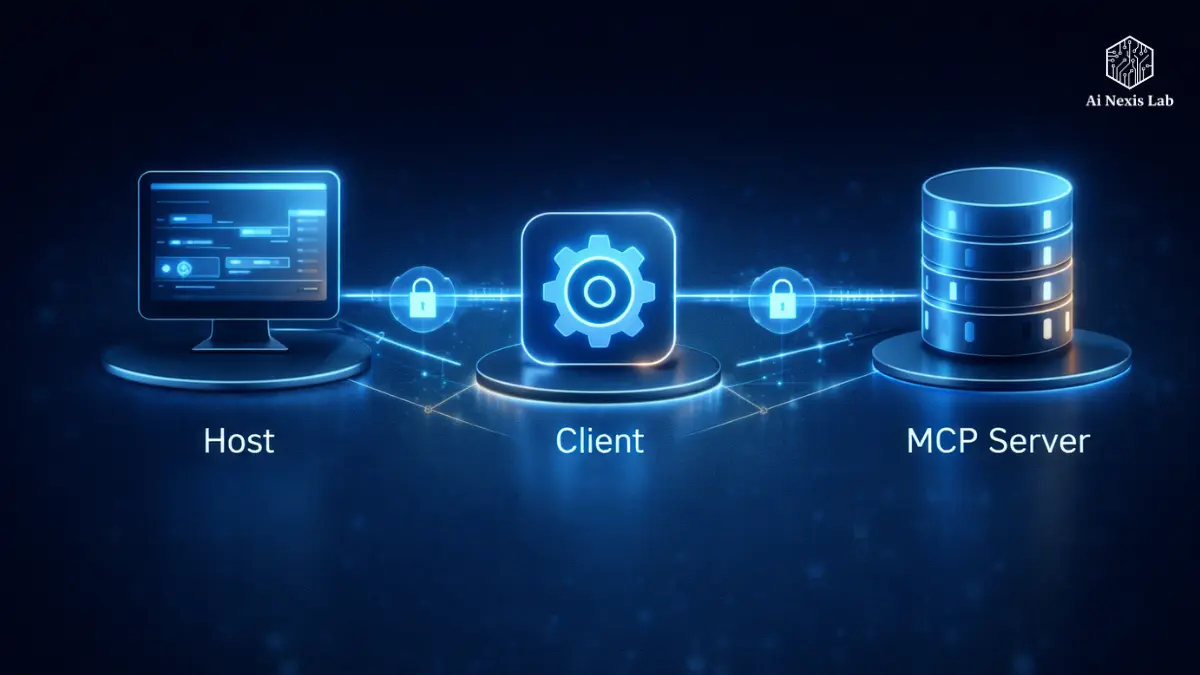
In MCP, we have three main players:
1. Host
This is the application where the LLM lives — think of tools like:
A cloud desktop
An IDE extension
A notebook environment
It’s where you type your prompt.
2. Client
The client sits inside the host and manages the connection. It understands MCP messages and coordinates the communication between the AI and your server.
3. Server
This is the interesting part.
Your MCP server is the thing that exposes tools, such as:
- “Get weather information”
- “Pull a webpage”
- “Query this database”
- “Read files in this folder”
From an AI perspective, these tools seem native – as if they were built into the system itself. Behind the scenes, they’re just functions you write.
And because everything is standardized, hosts can plug into servers without a custom adapter every time.
That’s magic.
Part 1: Setting Up Your First MCP Server
To see MCP in action, let’s build something small but useful:
A server that can:
- Get the weather
- Read content from a webpage
This is simple enough to understand — but realistic enough to show how real AI-powered tools are interconnected.
We will use Python and a framework called FastMCP, which makes MCP servers quick to set up.
Prerequisites
You will need:
- Python 3.10 or newer
uv— a modern package manager that resembles pip in turbo mode
You can install uv like this:
curl -LsSf https://astral.sh/uv/install.sh | shCreate a project:
mkdir my-mcp-server && cd my-mcp-server
uv init
uv add "mcp[cli]" httpx
That gives us a clean project ready for MCP development.
Writing a Weather and Web Server
Create a file called server.py.
Inside it, we:
- Start the FastMCP server
- Define the tools that the AI can call
- Run the server
Here is the basic structure:
from mcp.server.fastmcp import FastMCP
import httpx

mcp = FastMCP("MyContextServer")

@mcp.tool()
async def get_weather(city: str) -> str:
    """Fetch the current weather for a given city."""
    return f"The weather in {city} is currently 22°C and sunny."

@mcp.tool()
async def fetch_website(url: str) -> str:
    """Read the content of a URL to provide context."""
    async with httpx.AsyncClient() as client:
        resp = await client.get(url)
        return resp.text[:1000]

if __name__ == "__main__":
    mcp.run()
Even though this is a demonstration and we are using fake weather data, it shows the flow:
- AI asks for weather
- Server executes code
- Response comes back in standard MCP format
That standardization is what makes MCP powerful.

Connecting your server to an AI host
Running a server alone won’t give you much to see.
You need to connect it to something that speaks MCP.
If you are using Cloud Desktop, you just have to tell it where your MCP server resides. Open your configuration file and register your server:
{
  "mcpServers": {
    "my-custom-server": {
      "command": "uv",
      "args": ["run", "/path/to/your/server.py"]
    }
  }
}
Restart the cloud desktop – and suddenly, your AI agent now has access to your server tools.
No plugin store.
No weird wrappers.
Just a protocol handshake – clean and predictable.
Part 2: Security Reality Check
So far, everything seems exciting.
But this is where the real-world concerns begin.
Once AI:
- Fetch websites
- Read files
- Execute commands
- Query systems
- …it has agency.
And agency without rails can be dangerous.
Imagine an AI being instructed (accidentally or through malicious signaling) to:
- Delete logs
- Overwrite important files
- Call a destructive API
- Drop a production database
If your MCP server blindly executes whatever comes along, you have created a risk vector.
This is why modern AI system design emphasizes security and monitoring from day one – not as an afterthought.
Principle #1: Least Privilege Always Wins
Never give AI more power than absolutely necessary.
It seems obvious, yet most dangerous incidents occur because systems were overly permissive.
Least privilege in an MCP environment looks like this:
Scopes API keys
If your tool integrates with something like GitHub:
- Don’t give it full repo control
- Give it read-only access
- Limit it to a specific repo if possible
Defaults to read-only
Unless a task actually needs to be written or deleted – assume everything should be non-destructive.
For example:
- Allow
read_db, but notdrop_db - Allow fetching content, but not modifying it
- Log access, but deny execution until explicitly reviewed
MCP tools should gain trust gradually – not starting with root permissions.
Principle #2: Human-in-the-loop (HITL) saves you
Fully autonomous systems are efficient – until they’re inefficient.
Humans are still better at making decisions, especially when the stakes include:
- Irreversible data loss
- High cost
- Security impact
The MCP specification includes something extremely powerful for this:
Sample (permission requests)
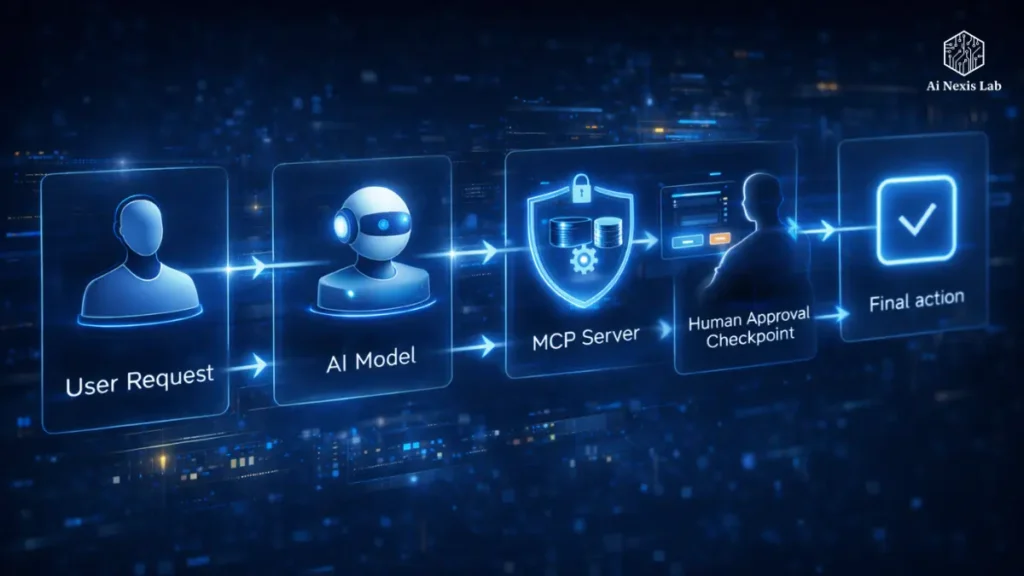
The idea is simple:
- The AI decides it wants to perform a risky action
- The MCP server doesn’t immediately proceed
- Instead, it asks the user for permission
The user sees something like:
“This agent wants to delete the
config.oldfile. Allow?”
The action only continues after explicit permission.
This creates a natural safety barrier. Not every tool needs it – but anything destructive definitely does.
Think of it like the seatbelt of the MCP.
Principle #3: Identity and Representation
Another subtle but dangerous mistake is letting AI act as you.
Never, under any circumstances, give your agent:
- Your personal account credentials
- Admin passwords
- Unrestricted authentication tokens
Instead, rely on delegation.
The right way looks like this:
- Generate temporary tokens
- Restrict their scope
- Give them a short expiration window (e.g., 15 minutes)
That way, even if something goes wrong, the damage window is small – and limited in scope.
A Quick Security Checklist
Here’s an at-a-glance summary that’s worth bookmarking:
| Feature | What it prevents | What to do |
|---|---|---|
| Tool scoping | Too much agent power | Expose only safe, narrow tools |
| Human approval | Unintended destructive actions | Require explicit user approval |
| Local transport | Data leakage | Use stdio to keep communication local |
| Sandboxing | System compromise | Run the server in Docker or a confined VM |
Each one helps alone. Together, they create a strong, layered defense.
Why HITL is not a limit – it’s the future
A popular dream is that AI agents will run everything automatically:
- Read the data
- Reason it
- Act on it immediately
And yes – autonomy is powerful.
But in real systems – especially those involving money, user data, system access, or infrastructure – reliability trumps speed.
Human-on-the-loop (monitoring actions)
and
Human-in-the-loop (approving actions)
are practical, responsible models. They give organizations confidence that:
- Actions are auditable
- Approvals are traceable
- Accidents are caught before they impact
MCP naturally supports this mindset.
And that’s a big reason why it’s becoming so popular.
Expanding Your MCP Server: Where You Can Go Next
Once your first MCP Server is up and running, you can expand it to:
- Integrate databases
- Automate workflows
- Manage files more intelligently
- Orchestrate cloud resources
Imagine you ask your AI:
“Review the last 50 customer support tickets and summarize recurring issues.”
Or:
“Query the sales database and show month-by-month revenue trends.”
They’re all real – as long as you protect them properly.
If you want, I can show you a more complex example that involves database operations, role-based access, and human approval gates. Just let me know.
The Big Picture: AI You Can Really Trust
The Model Reference Protocol is not just another technical specification.
It represents a shift in mindset:
Instead of forcing everyone to reinvent integration and security,
why not standardize a secure way for AI to connect to the world?
With MCP, developers get:
- Consistency
- Reliability
- Interoperability
And users get:
- Control
- Visibility
- Accountability
Autonomous AI doesn’t have to be careless. With HITL and thoughtful security design, it becomes something we can truly use with confidence.
Frequently Asked Questions (FAQ)
Q1: What problem does MCP actually solve?
It eliminates the chaos of custom AI integration. Instead of writing a separate plugin or adapter for each tool, MCP provides a standard interface. Any MCP-aware host can talk to any MCP server.
Q2: Is MCP only for cloud desktops?
No. Cloud Desktop is simply a host that supports MCP. Other tools, IDEs, and platforms can also implement MCP. This protocol is designed to be ecosystem-wide.
Q3: Can MCP give AI access to local files?
Yes — but only if you explicitly create tools that expose file access. That’s why a least privilege design is essential. You control exactly what the AI can see.
Q4: What happens if an AI tries to execute a dangerous command?
If your server is designed correctly, the request is either:
1) Blocked completely
2) Routed through a human-in-the-loop approval screen
The responsibility lies with the server implementation – which is why security planning is important.
Q5: Do I need to be a security expert to use MCP?
Absolutely not. Start with simple defaults:
1) Read-only tools
2) Scopes tokens
3) Approval signals for risky actions
That significantly reduces most real-world risks.
Q6: Why not let AI do the work completely automatically?
Automation is exciting — but mistakes in machine speed are costly. HITL provides a railing that maintains autonomy without giving up control.
Q7: Can MCP be used for internal tools in companies?
Absolutely. In fact, that’s where it shines. MCP can securely connect AI assistants to internal dashboards, CRM, logs, analytics systems, and more.
Q8: Is MCP difficult to learn?
If you understand APIs or basic backend concepts, you will learn it quickly. Frameworks like FastMCP exist specifically to make it easier.
Q9: What next after setting up a simple server?
Typical next steps include:
1) Adding authentication
2) Integrating the database
3) Logging and audit trails
4) Creating a dashboard to monitor agent activity
And finally: designing more advanced AI-driven workflows.
Final Thoughts
The AI world is moving rapidly, and each new capability introduces new responsibilities. The Model Context Protocol gives developers a way to build powerful systems that don’t sacrifice security.
By combining MCP with human-in-the-loop controls, scoped permissions, and thoughtful security design, you get:
AI agents that are actually useful
Workflows that scale
Peace of mind that nothing is going quietly rogue
It’s not about slowing down AI – it’s about making sure it moves in the right direction.