The AI Performance Leap: AI Core Web Vitals Optimization to Reach 100/100 Fast With Smart Front-end

How AI Front-End Optimization Fixes LCP, INP, and CLS for a Perfect Score
Why even great websites seem slow
Learn how AI Core Web Vitals Optimization helps you quickly reach a 100/100 score by fixing LCP, INP, and CLS using smart front-end performance strategies.
If you’ve spent any time learning modern front-end development, this situation might sound familiar. You’ve done the right things. You’ve gone beyond the basics, embraced a component-based architecture, embraced modern frameworks, and maybe even experimented with micro-frontends. On paper, your site should be fast.
Then you open Google PageSpeed Insights.
Yellow. Sometimes red.
Your site may seem fast, yet Google’s data – and the real-world experience of your users – say otherwise. This disconnect is one of the most frustrating realities of modern web development. Building features has never been easier. It’s never been harder to make those features truly fast, stable, and responsive.
That’s the performance paradox of today’s web.
In 2025 and beyond, speed is no longer a nice extra point. It’s the baseline. Core web vitals define whether your site competes or quietly fades into obscurity. And artificial intelligence has fundamentally changed how to win that war.
This article is about crossing the final hurdle – not just about passing performance tests, but about intelligently achieving a 100/100 Core Web Vitals score using AI-powered front-end optimization tools. Think of it as moving from “good engineering” to high performance engineering.
Welcome to the AI Performance Leap.
Core Web Vitals: The New Currency of SEO
Search rankings used to reward clever tactics: keyword stuffing, link manipulation, and technical loopholes. Those days are mostly over. Google has made its priorities clear – user experience is king, and Core Web Vitals is how that experience is measured.
A strong Core Web Vitals score directly impacts:
- Search visibility
- Conversion rate
- Bounce rate
- User trust
For competitive sites, a few milliseconds can be the difference between ranking first and disappearing on the second page.
Let’s briefly explore what really matters to us.
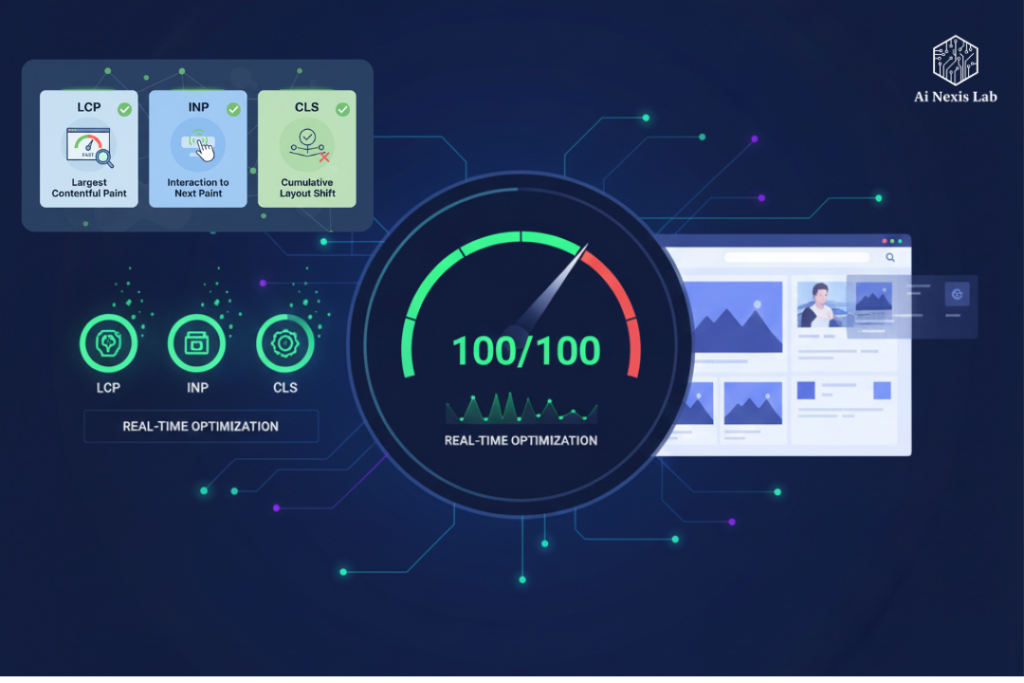
Largest Contentful Paint (LCP): First Impression Count
LCP measures how quickly the main content of a page appears. This is the moment when users subconsciously decide whether your site feels fast or not.
Why it’s hard: LCP relies on asset ordering, server response time, CSS blocking, JavaScript execution, and image delivery. Manually identifying specific bottlenecks is tedious and error-prone.
Interaction with Next Paint (INP): Response under pressure
INP tracks how quickly your site responds when a user clicks, taps, or types. It reflects real-world responsiveness, not theoretical speed.
Why it’s hard: JavaScript-heavy applications often block the main thread. Finding a single function or third-party script that causes delays can be like finding a needle in a haystack.
Cumulative Layout Shift (CLS): Visual Stability
CLS measures how much your layout moves unexpectedly. Sudden jumps break trust and lead to misclicks.
Why it’s hard: CLS issues vary by device, screen size, and network speed. A page that looks static on your laptop may display poorly on a slow mobile connection.
The underlying problem in all three metrics is complexity. Modern front-end stacks generate performance debt faster than humans can realistically manage on their own.
This is where AI changes everything.
How AI is transforming front-end performance work
AI is not replacing front-end developers. It is reshaping their role.
Instead of spending days guessing waterfall profiling and optimizations, developers move to a higher-level position: defining goals, reviewing AI recommendations, and validating results.
Today’s AI performance ecosystem falls into three main areas.
1. AI-assisted code generation and refactoring
AI coding tools are often framed as productivity boosters, but their performance impact is just as important.
Smarter defaults, fewer errors
Tools like GitHub Copilot and Tabnine are trained on large volumes of modern, well-optimized code. When thoughtfully asked, they naturally lean towards:
- Non-blocking async patterns
- Cleaner state management
- Reduced re-renders
These are important for INP and overall responsiveness.
Better signals, better performance
A simple change in how you ask makes a big difference:
- Instead of: “Get data from API“
- Try: “Get data asynchronously without blocking the main thread and cache results efficiently”
AI responds with not only faster typing, but also structurally better code.
Less boilerplate, less performance debt
Every unnecessary line of code is potential overhead. AI-generated boilerplate reduces the chance of subtle errors that lead to layout thrashing or inefficient rendering.
2. AI-powered performance profiling and auditing
This is where AI delivers its biggest performance gains.
From symptoms to root causes
Traditional tools tell you what’s slow. AI-powered profilers explain why it’s slow.
Instead of:
“This script took 480ms.”
You get:
“This delay comes from synchronous hydration in component X and can be reduced by partial hydration.”
That level of insight saves hours – sometimes days – of investigation.
Intelligent performance budget
AI performance may impose limitations during development. If a new feature increases the bundle size or blocks the main thread, the system doesn’t just fail the build. It explains exactly which files need refactoring, tree-shaking, or lazy loading.
This prevents performance from gradually declining over time.
3. AI-optimized content delivery
Performance isn’t just about code. It’s about how assets reach users.
Adaptive image distribution
AI-powered CDNs analyze device type, network speed, and viewport size in real time. Images are automatically converted to the most efficient format and resolution – often AVIF or WebP – without any developer intervention.
This alone can dramatically improve LCP.
Predictive prefetching
AI models can predict what users will click next. Scripts and data are silently prefetched in the background, making navigation feel instantaneous and improving INP.
AI strategies for every core web vital
Accuracy is essential to achieving a perfect score. Here’s how the AI tackles each metric.
LCP: Optimizing the Critical Path
AI-generated critical CSS
Instead of loading the entire stylesheet in advance, AI tools analyze your layout and inline only the CSS needed for the folded-up content.
This greatly reduces render-blocking resources and allows key content to appear faster.
Smart resource hinting
AI-powered service workers observe real user situations and dynamically adjust preload and preconnect strategies, reducing critical milliseconds in network latency.
INP: Keeping the main thread free
AI-Detected Long Tasks
AI performance tools correlate user interactions with execution traces, which accurately identify which function is blocking the response.
They often recommend concrete improvements such as:
- Web Workers
- RequestIdleCallback
- Delayed Start
Automated code splitting
Instead of manually configuring each dynamic import, AI analyzes usage patterns and automatically splits rarely used features into lazy-loaded chunks.
This keeps the core bundle lean and responsive.
CLS: Enforcing Visual Stability
AI Visual Regression Testing
Computer vision-based tools compare builds not just pixel by pixel, but visually. Even small layout changes are marked before they reach production.
Dynamic space reservation
AI observes dynamic content like ads or embeds over time and calculates the maximum space required. Containers are automatically sized to prevent layout jumps.
The Hidden Performance won AI unlocks (which most developers miss)
One of the most underrated benefits of AI-powered front-end optimization is how it exposes problems to developers that they don’t even realize exist. Traditional performance work focuses on obvious issues: large images, unused JavaScript, or slow APIs. AI goes deeper by identifying behavioral inefficiencies that only appear at scale.
For example, AI-powered analytics can detect interaction patterns where users consistently hesitate or abandon an action – not because the UI is confusing, but because micro-delays subtly break trust. A button that responds in 300ms is technically a pass, yet AI models trained on real user behavior can reveal that even moving 80-100ms away from that interaction significantly improves completion rates. These are optimizations that humans rarely prioritize because they feel “good enough,” but AI sees them as clear opportunities.
AI is also excellent at identifying performance declines over time. Many sites launch quickly and gradually slow down as new features, scripts, and marketing tools are added. AI-powered monitoring doesn’t just provide alerts when metrics cross a threshold; He understands trends. It can alert you that your LCP is slowly moving upwards with each release – weeks before it becomes an SEO problem. That early signal allows teams to proactively address issues rather than hunker down after a ranking drop.
Another overlooked area is cross-device display compatibility. Developers often test on fast machines and stable networks. However, AI simultaneously evaluates performance across thousands of device and network combinations. It may find that the layout is stable on modern phones but changes on mid-range Android devices, or that INP only increases on slower CPUs. These insights are incredibly difficult to surface manually, yet they are deeply important to real-world users.
Perhaps most importantly, AI helps teams make better trade-offs. Not every optimization is shipping-worthy. Some changes improve the metrics but hurt readability, accessibility, or maintainability. Advanced AI tools increasingly provide context-aware recommendations, which show estimated performance benefits along with potential complexity costs. It turns performance optimization into a strategic decision rather than a blind pursuit of numbers.
Over time, how these teams think about performance changes. Instead of treating core web vitals as a periodic audit task, they become a continuous design constraint – one that is considered from the first component sketch to final deployment. AI makes that mindset practical by handling the constant measuring, comparing, and fine-tuning in the background.
The result isn’t just a high PageSpeed score. It’s a site that consistently feels simple, predictable, and reliable – regardless of device, location, or network conditions. This type of experience is what users remember, return to, and recommend.
The role of the developer in an AI-driven world
AI doesn’t eliminate the need for skills. It raises the bar.
Modern front-end developers become:
System architects who understand how performance decisions ripple through the stack
Prompt engineers who clearly communicate constraints and goals
Auditors who validate that optimizations don’t break usability or accessibility
This shift frees developers from endless debugging and allows them to focus on thoughtful design, clean architecture, and meaningful user experiences.
A Realistic Transformation Scenario
Imagine an e-commerce product page with a PageSpeed score of 48.
Problems:
- Large product images slow down LCP
- Heavy JavaScript blocks input
- Review widget causes layout changes
AI-Driven Results:
- Images are automatically served in the best format
- Blocking JavaScript is removed from the main thread
- Layout space is dynamically reserved
Outcome: A clean 100/100 score achieved through configuration and validation — not weeks of manual tuning.
Final thoughts: Building for a faster web
Mastering core web vitals is no longer optional. It’s fundamental.
Using AI doesn’t mean cutting corners. It means removing the guesswork and focusing human effort where it matters most.
Start small. Add an AI-powered optimization to your workflow and observe the results. Once you see how quickly performance improves, it’s hard to go back.
The future of the web belongs to sites that are fast by default. With AI, you’re not just keeping up – you’re moving forward.
Frequently Asked Questions (FAQ)
Q1: Is a 100/100 Core Web Vitals score realistic for most sites?
Yes. While not every page needs to be perfect, AI-powered tools can achieve near-perfect scores for most modern applications.
Q2: Do I need advanced AI knowledge to use these tools?
No. Most AI performance tools are designed to integrate into existing workflows with minimal setup.
Q3: Will AI optimization hurt accessibility in UX?
Not when properly reviewed. Developers remain responsible for validating changes and ensuring that the user experience remains intact.
Q4: Are AI tools expensive?
Costs vary, but many tools offer free tiers or pay-for-impact pricing. The ROI often outweighs the cost.
Q5: Should small sites take care of core web vitals?
Sure. Smaller sites often benefit the most, as increased performance directly improves visibility and engagement.