60-Minute Prototype: How I Built a Functional App Using Claude Code and Copilot Before My Coffee Got Cold

Discover the AI coding workflow developers use to build real apps in 60 minutes. Learn 7 powerful methods using Claude Code and GitHub Copilot.
Ideas are cheap. Execution is where most people get stuck.
You’ve probably experienced this exact situation: It’s late evening, maybe around 9 p.m., and a sharp thought pops into your head. There is no ambiguity – something definite. Maybe it’s a small SaaS tool that monitors your freelance income on the platform. Maybe it’s a dashboard that tracks growth metrics for your newsletter. Maybe it’s a specific tracker for plant watering schedules or Discord community activity.
You open your Notes app and write it down.
And that’s where the story usually ends.
Not because the idea is bad – but because the initial friction is enormous. Setting up the repo. Choosing a framework. Configuring environment variables. Installing dependencies. Debugging the first broken build. Fighting CSS alignment problems that somehow take an hour to solve.
By the time you’re ready to actually create an idea, the excitement has gone.
But the situation changed dramatically between 2024 and 2026. AI tools are no longer just assistants for writing code snippets. They have evolved into collaborators who can plan architecture, scaffold entire projects, debug bugs, and even deploy applications.
This change has opened up something powerful: the disposable prototype.
A disposable prototype is exactly what it sounds like – an app you quickly build to test an idea. It’s not meant to be perfect. It has to exist long enough to answer one question:
“Is this idea worth pursuing?”
And today, with the right workflow, you can create a working prototype in less than an hour.
This guide uses the specific stack and workflow I use – which I call the Velocity Stack – that combines two AI tools with very different strengths:
- Claude Code (a terminal-based AI agent)
- GitHub Copilot (a real-time coding assistant)
Used together, they dramatically narrow the gap between idea and execution.
Grab a coffee. By the end of this in-depth study, you will understand how to go from Empty Folder → Live URL in 60 minutes.
Table of Contents
Power Couple: Why Claude Code and Copilot Aren’t Redundant
One mistake developers make with AI tools is treating them like a religion.
You’ll hear statements like:
- “I just use copilot.”
- “The cursor changed everything.”
- “Claude is what you need.”
That mindset misses the point.
Different AI tools are best at different levels of the development stack.
Trying to use one tool for everything slows you down.
To move forward quickly, you need two complementary roles.
Architect: Claude Code
Claude Code runs inside your terminal and behaves more like an engineering agent than a chatbot.
It can:
- Read your project structure
- Create or edit files
- Run terminal commands
- Install packages
- Run tests
- Debug errors
Instead of giving you instructions to execute manually, the Claude can perform actions directly in your environment.
For example, if you tell the Claude:
Start a Next.js project with Tailwind and Lucid-React.
It won’t just give you commands.
It will:
- Run
npx create-next-app - Configure Tailwind
- Install dependencies
- Adjust configuration files
- Clean up unnecessary boilerplate
In other words, the Claude handles macro-level tasks.
Think of it as an architect and general contractor.
The Craftsman: GitHub Copilot
GitHub Copilot plays a completely different role.
Instead of managing the project structure, it acts as a predictive coding assistant within your editor.
As you type, Copilot suggests:
- Function implementation
- API calls
- Validation logic
- SQL queries
- Error handling
Copilot excels at local context awareness.
For example, if you define:
const userEmail = formData.emailCopilot can estimate:
- Validation rules
- Formatting checks
- Database insertion logic
This makes it suitable for micro-level tasks.
If Claude builds a house, the copilot installs the wiring and completes the drywall.
Actual workflow
The fastest developers in 2026 use a hybrid workflow:
Claude code → Macro tasks
- Project scaffolding
- Architecture decisions
- Dependency installation
- Error debugging
- Dev server control
- Deployment setup
GitHub Copilot → Micro tasks
- Function logic
- API requests
- Form validation
- Database queries
- Small UI components
Once you understand this division of labor, development speed increases dramatically.
Phase 1: “Quantum Scaffolding” (Minutes 0-10)
Most projects lose momentum before the real work begins.
The general sequence looks like this:
- Decide between frameworks
- Start the project
- Install dependencies
- Configure environment variables
- Fix the first broken build
- Remove boilerplate
By the time the project actually runs, 20-30 minutes have already passed.
Claude code eliminates almost all of this.
Instead of writing individual commands, you provide a command-line narrative.
Example Project: LinkPulse
Let’s make something useful.
Idea: LinkPulse
A tool that monitors website uptime and sends alerts to the Discord webhook when the site goes offline.
Nothing revolutionary – but perfect for a prototype.
Step 1: Start Claude Code
Open your terminal and run:
claude devThis launches Claude into your development environment.
Step 2: Give the Claude a “God View” Prompt
Instead of giving small commands, describe the end state you want.
Example Prompt:
I want to build a LinkPulse monitoring application using Next.js, Tailwind, and Supabase. Start the project, remove the default homepage boilerplate, and create a dashboard layout with a sidebar.
After the Claude:
- Create a Next.js project
- Install Tailwind
- Configure the project structure
- Generate layout components
- Remove unnecessary template code
The process takes about 2-3 minutes.
Parallel Productivity
While the Claude is building the project locally, you should already be doing the next step:
Create the Supabase project in the browser.
This is an important productivity technique.
Instead of waiting for tasks to be completed sequentially, work in parallel.
By the time the Claude project completes setup, your database will be ready.
Total time elapsed: 10 minutes.
You already have:
- Project structure
- Dashboard layout
- Backend service ready
In ten minutes, the skeleton of the application already exists.
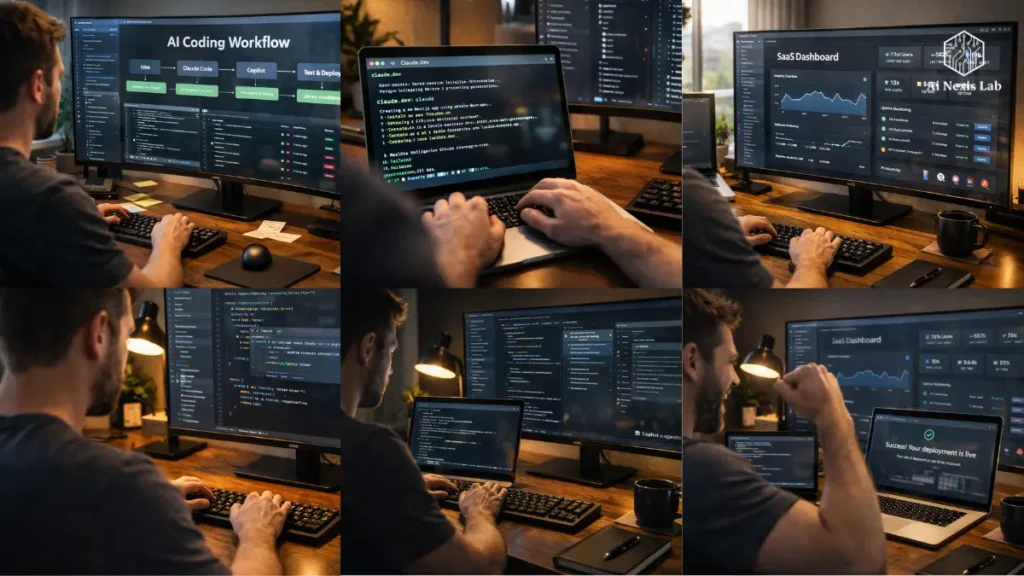
Phase 2: Logic Injection with GitHub Copilot (Minutes 10-25)
The shell is ready.
Now the application needs real functionality.
This is where Copilot becomes incredibly useful.
Open a new file:
lib/monitor.tsStart writing the function.
export const checkUrl = async (url: string) => {Copilot will immediately suggest the rest.
Typically something like this:
- Get request
- Timeout handling
- Response status checking
- Latency measurement
- Error catching
Instead of writing 20-30 lines of boilerplate, you approve the suggestion.
Comment-Driven Development (CDD)
Sometimes the copilot guesses wrong.
Don’t delete everything.
Guide it.
Add a comment.
Example:
// Calculate average uptime over the last 24 hours using logs tableCopilot will automatically generate SQL queries or database logic.
This technique – called comment-driven development – is one of the fastest ways to work with AI coding tools.
You are not writing code.
You are writing instructions for code generation.
Inverse Debugging Protocol
Things will break.
Always.
Traditional debugging looks like this:
- Copy error
- Google it
- Open Stack Overflow
- Try random fixes
- Repeat
That workflow wastes time.
Instead, use inverse debugging.
When an error appears, send it back to the Claude.
Example prompt:
I’m getting a 500 error on /api/check. Here is the log. Fix the problem and restart the dev server.
Claude:
- Read stack traces
- Identify bugs
- Patch files
- Restart servers
Most debugging cycles will be reduced from 10 minutes to less than 60 seconds.
Phase 3: Polished Veneer with Tailwind (Minutes 25-40)
A working application prototype that looks terrible is not a prototype.
It is a destroyer of credibility.
Users immediately evaluate software based on design quality.
The good news is that modern UI frameworks make this easy.
Instead of creating components manually, ask the Claude to generate them.
Example Prompt:
Create a responsive data table using Shadcn UI that displays the URL, status indicator, last checked time, and a delete button.
Claude will:
- Install required packages
- Generate UI components
- Configure styles
- Connect state management
You’ll have a professional-looking dashboard in minutes.
Be specific with the design language
Vague prompts produce a generic UI.
Avoid:
“Make it nice.”
Use specific design styles:
- Bento Grid Layout
- Glassmorphism
- Minimal SaaS Dashboard
- Dark Analytics Theme
A clear design language dramatically improves AI-generated interfaces.
Connectivity Blueprint (Minutes 40-50)
Now we connect everything.
The monitoring logic works.
The UI works.
But the app still needs to trigger Discord alerts.
Instead of reading API documentation for 30 minutes, let the Claude handle the integration.
Example prompt:
Integrate Discord webhook notifications when status is !== 200 using the environment variable DISCORD_WEBHOOK_URL.
The Claude will generate:
- HTTP request logic
- JSON payload formatting
- Error handling
- Environment variable usage
In the meantime, you can use Copilot to create a mock data generator so that the UI shows real results.
Deployment: One-Yard Line (Minutes 50-60)
Not real until project deployment.
This step used to take significant effort.
Today it is insignificant.
Ask the Claude:
Start a git repo, create .env.example, and give me the Vercel deployment command.
The Claude will prepare everything necessary.
Then run:
vercelIn a few minutes you get a live URL.
Open it on your phone.
Click a button.
If the webhook fires and your Discord notification appears, you’ve succeeded.
Your idea is now a working product.
Total time: 60 minutes.
High-Speed Problem Solving: The Cognitive Refraction Method
Speed isn’t just about the tools.
It’s also about how you think.
Traditional problem solving is linear:
Problem → Research → Solution
That approach doesn’t scale to complex systems.
Instead, use a technique called cognitive refraction.
Divide each problem into three levels.
Lighting (UI Layer)
Visual Issues:
- CSS
- Layout
- Responsiveness
- Component Rendering
These are surface-level issues.
Heat (Logic Layer)
Processing Issues:
- Algorithms
- API Calls
- Event Handling
- Server Functions
These affect how the application behaves.
Structure (Architecture Layer)
System-level issues:
- Database schema
- Project organization
- Dependency conflicts
- Server configuration
These affect how the system is built.
Why This Is Important
When a bug appears, identify the level.
Lighting issue → UI fix
Use Copilot.
Heat problem → Logic fix
Use Copilot or Claude.
Structural problem → Architecture fix
Use the Claude.
This mental model eliminates confusion and speeds up debugging.
Insider Tips for AI-Driven Development
Here are the tricks experienced developers use when working with AI tools.
Context Purification
After about 20 minutes of continuous conversation, AI sessions degrade.
The model begins to lose context.
Restart the session periodically.
Fresh sessions produce clean results.
Golden Prompt File
Create a file in your project root:
prompt.mdAdd rules such as:
- Use TypeScript
- Choose functional components
- No semicolons
- Follow Tailwind conventions
Then instruct the Claude to read this file before the main tasks.
This keeps the codebase consistent.
Avoid Death Loops
Sometimes AI tools repeat the same incorrect corrections.
If this happens:
Stop.
Write 3-5 lines manually.
Then tell the AI to continue.
This resets its understanding.
The New Reality of AI Development in 2026
The coding landscape has changed dramatically.
In 2026:
Over 70% of developers use AI-assisted coding daily (Stack Overflow Dev Survey 2026).
GitHub Copilot has surpassed 2.3 million active enterprise users.
AI-assisted tools now generate 40-55% of new code in production repositories.
This does not mean that developers are obsolete.
It just means the skill set has changed.
Today’s most valuable developers are not the fastest typists.
They’re the best system directors.
People who know:
- How to create a project
- How to ask specific questions
- How to test output
- How to configure AI tools
The job is no longer about coding line-by-line.
The job is to design systems and guide machines.
Frequently Asked Questions
Is this just copy-pasting AI code instead of developing learning?
Not really. The real skill is no longer in memorizing syntax. Valuable skills are in understanding architecture, logic flow, and system design. You still need to know what components your application requires, how APIs interact, and how data moves through your system. Without that understanding, AI suggestions become noise. Think of it like directing a film: you can’t hold the camera, but you still control the story, the structure, and the end result.
Which AI model will work best for coding in 2026?
By 2026, Claude Sonnet-class models and GPT-5-level models will dominate coding workflows. The Claude performs better for long logic chains and architecture tasks, making it ideal for terminal-based agents like Claude code. GPT models excel at rapid iteration, churn, and UI refinement. Most experienced developers actually use multiple models simultaneously, choosing the right tool for each stage of development, rather than committing to a single ecosystem.
Can this workflow create production-ready software?
Yes – but not immediately. Rapid prototyping workflows are designed to quickly validate ideas, not to finalize products. Before scaling to real users, developers still need to perform security audits, optimize database queries, and implement rate limiting, monitoring, and caching. The prototype stage answers whether the idea works or not. If the idea gains traction, you invest time to harden the system for reliability and scale.
What if I don’t know React or a modern JavaScript framework?
You can still build software with this workflow. AI tools work in languages like Python, Go, Rust, PHP, and low-code frameworks. For example, many founders use Python with Streamlit or FastAPI for rapid prototyping. The important part isn’t mastering a specific framework – it’s being able to clearly describe the behavior of the application. If you can specify what the software should do, modern AI tools can often generate a working first version.
How much will this workflow cost in 2026?
Typical monthly costs look like this:
1) AI coding subscription: $20–$25
2) GitHub Copilot: $10–$19
3) Hosting (Vercell or similar): Often free for prototypes
4) Database services (Supabase/Firebase): Free tier available
For around $40 per month, a solo developer can build and deploy products that previously required a small team. If the equipment saves even five hours of work per month, the cost is easily justified.
Final Verdict:
There is a cemetery that was never sent.
Not because they were bad.
Because they seemed too heavy to begin with.
The biggest change introduced by AI development is not speed.
It is psychological momentum.
When you know you can build a working prototype in an hour, the barrier to experimentation disappears.
Instead of sitting on ideas for months, you test them on the same day.
Most will fail.
That’s good.
Because what works can evolve into real businesses.
Claude Code and GitHub Copilot do not replace developers.
They amplify individual builders.
Today a solo developer can prototype at the speed at which entire teams worked just a few years ago.
So here is the challenge.
Choose the idea you are sitting on.
Set a timer for 60 minutes.
Open your terminal.
Start directing.
You’ll be surprised what exists after an hour.