
How to Build, Launch, and Monetize Your First AI App in 2026

Learn how to build, launch, and monetize AI apps in 2026 using no-code tools, micro-SaaS strategy, and proven AI monetization models. A practical, roadmap for solo founders and small teams
The Big Shift Nobody Talks About
In 2026, the most important skill in tech is no longer knowing how to code.
It’s about knowing what to build, who to build it for, and how to clearly explain your purpose so that machines can implement it.
If you’ve been following my journey, you’ve probably already seen 100 profitable AI application ideas for 2026. That list did its job – it showed what’s possible. But ideas alone don’t ship products, and listings don’t make money.
This guide is about implementation.
Not in a “Silicon Valley hustle” way.
Not in the “Learn 14 Framework” way.
But in a grounded, iterative way that real people are using to launch AI applications on weekends right now – not years.
This is a real-world roadmap from scratch to building, launching, and monetizing your first AI app in 2026, even if:
- You’re not a developer
- You don’t have funding
- You’re building alone
- You’ve never shipped a SaaS before
You need focus, curiosity, and the will to ship something small before perfection.
The Reality of 2026: Why “Micro-AI” Beats Big Ideas
Before tools, stacks, or prompts, you really need to understand the game you’re playing.
By 2026, the battle for “common sense” is over.
Companies like OpenAI, Google, and Anthropic have already won that race. You are not going to out-chat ChatGPT, out-search Google, or out-reason the cloud.
And that’s good news.
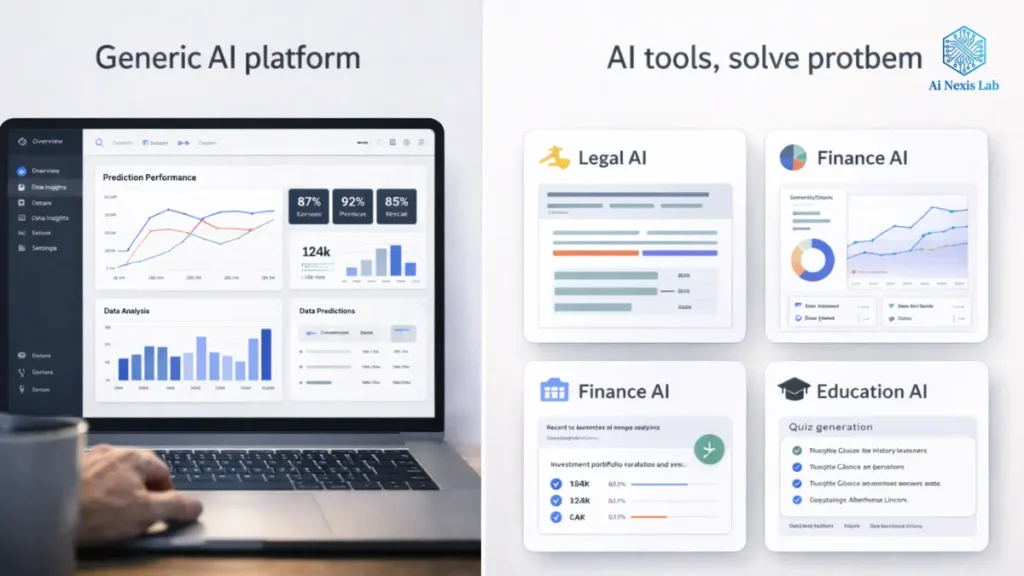
Because while giants are busy making everything for everyone, they are structurally bad at making something specific for a very special person.
That distance is where the money is.
The Rise of Vertical AI
In 2026, successful AI applications share three characteristics:
- They solve a narrow problem
- They serve a defined audience
- They deliver a measurable result
This is vertical AI.
Compare these two ideas:
- “AI writing assistant”
- “AI compliance checker for real estate disclosure documents in New York”
The first is a commodity. The second is a business.
Vertical AI applications win because:
- Users already understand the pain
- Willingness to pay is high
- Marketing is clear
- Competition is low
- Retention is stronger
This is why micro-SaaS + AI is the dominant model of 2026.
You are not building a platform.
You’re building a power tool.

Phase 1: Idea Validation (How to Avoid Creating a Ghost Town)
Most AI apps don’t fail because the tech doesn’t work.
They fail because no one cares.
The fastest way to waste three months is to build first and ask questions later.
The “Search-First” Validation Method
In 2026, search behavior is market research.
Start with tools like:
You’re not looking for ideas.
You are looking for complaints.
Look for phrases like:
- “How can I automate…”
- “Is there a tool…”
- “Why is [X] so hard…”
- “[Handling task]”
- “Software for [a very specific task]”
When people complain publicly, they are doing the validation work for you.
The Vibe Check (This step is more important than you think)
Once you find a recurring pain problem, do a “vibe check.”
Go where users already hang out:
- Subreddits
- Discord servers
- Facebook groups
- Industry forums
- Niche LinkedIn comments
If you see:
- Repeated frustration
- Spreadsheet-related solutions
- People tagging each other asking for tools
You’re not early – you’re on time.
The MVP is no longer an app
This is where 2026 is radically different.
Your minimum viable product is not a product.
It’s a prompt.
Open:
Give your app the most difficult version of the task it will need to perform.
If AI can:
- Understand the task
- Produce useful output
- Do it consistently
Then your app is viable.
If it fails in chat, it will fail in production.
This one step saves weeks of wasted development.
Phase 2: The Modern No-Code AI Stack
You don’t need to “learn AI”.
You need to orchestrate it.
In 2026, building an AI app means combining three layers:
1. Frontend: Where users touch the product
Your frontend choice is based not on skill, but on distribution.
Flutterflow
Best if:
- You want native mobile apps
- You care about simple UX
- You plan on App Store distribution
Bubble
Best if:
- You want complex workflows
- You’re building a SaaS web
- You need depth of logic
Glide
Best if:
- Your product is data-driven
- You’re building internal tools
- Speed is more important than customization
None of these are “starter” tools anymore. They’re production-grade.
2. Brain: Intelligence as an API
You are not training models.
You’re renting intelligence.
Common choices in 2026:
- OpenAI Assistants API – for memory-based applications
- Anthropic Cloud API – for long-form reasoning
- Replicate – for images, video, and specialized models
Key insights:
The value is not the model. The value is the context you wrap around it.
3. Glue: Automation is the product
This is where most beginners underinvest.
Tools like:
These tools:
- Control costs
- Prevent errors
- Enable scale
Your automation logic is your backend.
Thinking Like an AI Product Builder (Not a Tool User)
Before you start connecting APIs or designing screens, most “AI app tutorials” leave out an uncomfortable truth:
Tools don’t build successful AI products. Makes decisions.
In 2026, the barrier to creating an AI-powered app is low. Anyone can connect to the API, generate output, and deploy a no-code interface in a weekend. That’s not where most applications fail.
They fail because the builder never stops thinking like a product owner, not a tool operator.
This stage is about mental models – how successful micro-AI founders think before shipping anything real.
1. Your AI app is a decision engine, not a feature
A common mistake beginners make is building apps around what AI can do instead of what users need help deciding.
Users don’t wake up wanting:
- “AI summarization”
- “Image generation”
- “Text analysis”
They wake up wanting answers like:
- “Is this contract risky?”
- “Am I supposed to miss something important?”
- “Did I miss something important?”
- “What should I fix first?”
Strong AI apps break down uncertainty.
Before building, ask:
- What decision is my user struggling with?
- What happens if they get it wrong?
- How often is this decision repeated?
The more costly the mistake and the more frequent the decision, the greater the willingness to pay.
That’s why compliance, finance, education, legal, and operations applications will dominate micro-AI revenue in 2026. AI isn’t dominant – it’s a relief.
2. Narrow Inputs Beat Smart Outputs
Another silent killer of AI applications is unclear inputs.
Founders often think:
“If AI is smart enough, it will figure it out.”
In fact, the most reliable AI products aggressively block user input.
Examples:
- Dropdowns instead of free text
- Predefined document types
- Fixed workflows
- Guided steps instead of open prompts
Why this matters:
- Lower API costs
- More predictable output
- Easier debugging
- Better UX for non-technical users
In practice, this means that your app should feel a little restrictive. That’s a feature, not a flaw.
Users don’t want freedom – they want confidence.
3. Reliability beats intelligence (every time)
In 2026, users are no longer impressed that AI can “sometimes” do something.
They expect:
- Consistency
- Predictability
- Clear failure conditions
A boring AI that works 99% of the time beats a brilliant AI that fails quietly.
The real design consequences of this are:
- Always show progress status
- Handle empty or bad inputs gracefully
- Explain results in plain language
- Allow users to retry without friction
If your app ever makes users wonder, “Did this really work?”, you’ve lost trust.
And trust, not accuracy, is the real currency of AI products.
4. Cost awareness is part of product design
Unlike traditional SaaS, AI applications have variable unit economics.
Every click has a cost.
This means:
- You should think about cost when designing features
- “Just one more generation” is not free
- Power users can quietly kill margins
Smart founders design cost friction into production:
- Credit systems
- Daily caps
- Output limits
- Tier quality levels
This isn’t greed – it’s survival.
The best AI applications make costs invisible to users while remaining highly visible to the builder.
5. Explain the result, not the technology
Users don’t care:
- What model you used
- How big the context window is
- How advanced your prompt engineering is
They care:
- “What does this mean for me?”
- “What should I do next?”
- “Can I trust this?”
Each AI output should be followed by:
- A brief explanation
- A suggested action
- A confidence indicator (even if qualitative)
Think of your application less like a generator and more like a translator – turning machine output into human clarity.
6. Build for second use, not first
Many AI applications seem magical the first time.
Then users never come back.
Why?
Because the application was not designed for repetition.
Ask yourself:
- Why would someone use this again next week?
- What changes between uses?
- How does the app remember the context?
This is where “AI with memory” becomes valuable – not for innovation, but for speed.
Simple things help too:
- Saved history
- Comparisons between past outputs
- Progress tracking
- Small improvements over time
Retention is rarely about features. It’s about familiarity.
7. Manual First, Automated Second
One of the fastest ways to build better AI applications is to work manually first.
Before automating:
- Pretend you’re AI
- Do the work yourself
- Consider what’s unclear
- See where decisions matter
This shows:
- What inputs are actually needed
- Where users get confused
- What “good output” really looks like
Many successful micro-AI applications started out this way:
- Google Docs
- Spreadsheets
- Email services
- Internal tools
Automation should come last, not first.
Phase 3: Building a Real AI Application (End-to-End Example)
Let’s make this concrete.
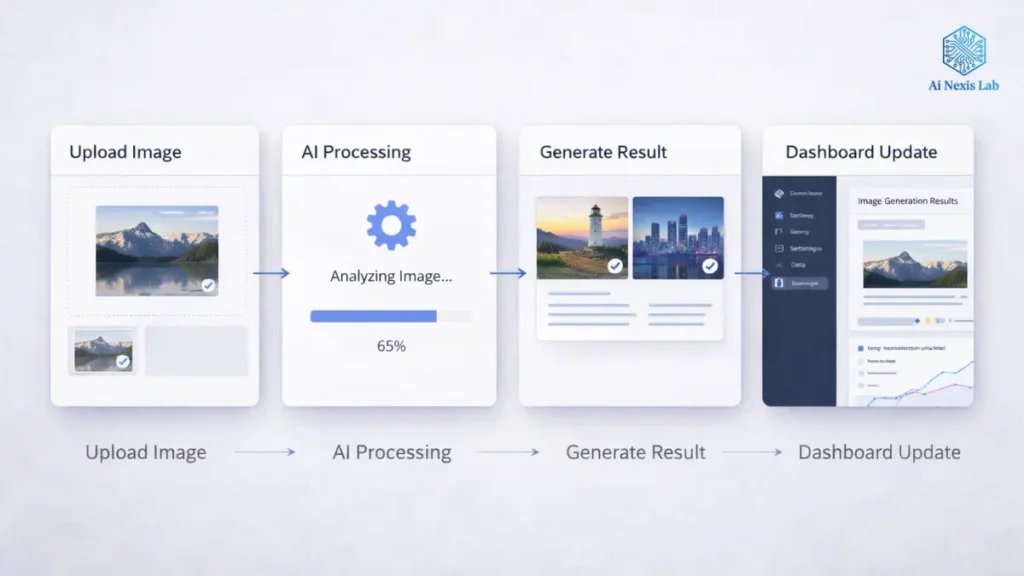
Imagine you are creating a virtual interior designer.
Step 1: Design the data first
Your database defines your product.
Create projects table with:
- User ID
- Uploaded image
- Style selection
- Output image
- Status
- Timestamp
If you design the data poorly, everything downstream breaks.
Step 2: Prompt Engineering is UX Design
Your prompt is not technical.
It is editorial.
Bad prompt:
“Redesign this room.”
Good prompt:
“You are a professional interior designer. Redesign this room in a Japanese style. Maintain realistic lighting, neutral tones, minimal furniture, and modern materials. Do not change the room layout.”
Clear instructions = consistent results.
Step 3: Build the Logic Loop
Your automation flow should be boring and predictable:
- User uploads image
- User chooses style
- Automation sends image + prompt
- AI generates result
- App updates project
- User gets notification
There is no magic. No complexity. Just flow.
Phase 4: Monetization that actually works in 2026
Pricing mistakes kill more AI apps than bad UX.
Why Flat Subscriptions Fail
AI costs are variable.
User behavior is unpredictable.
The $10/month unlimited plan works until:
- A power user burns through your API budget
- Or casual users churn before the value
Model 1: Credit-based pricing (default choice)
You pay per AI call.
Users pay per result.
Example:
- 3 free credits
- 20 credits for $15
- 100 credits for $49
These align the incentives.
Model 2: Weekly Passes
Good for:
- Students
- Exam Preparation
- Short-Term Needs
$4.99 for 7 days converts better than $20/month.
Model 3: B2B Licensing (Where the serious money lives)
Stop selling to individuals when teams exist.
If your app helps:
- Lawyers
- Realtors
- Recruiters
Sell to the organization.
$500/month for a team is easier than $10 for 50 users.
Phase 5: Distribution in a World Ruled by AI Search
You’re no longer just optimizing for Google.
You’re optimizing for machines answering questions.
Programmatic SEO is non-negotiable
Your AI application should generate content for itself.
Hundreds of pages.
Each one targets a narrow query.
This compounds quickly.
Build in public still works (if you’re honest)
Post:
- What broke
- What surprised you
- What users said
People don’t pursue perfection.
They chase progress.
Getting recommended by AI tools
To appear in AI answers:
- Be cited by real blogs
- Use structured data
- List your app on directories
- Be specific about what you do
AI prefers clarity over cleverness.
The 5-Week Launch Blueprint
| Week | Focus | Outcome |
|---|---|---|
| 1 | Validation | Confirm Real Pain |
| 2 | UI | Clickable Product |
| 3 | AI Integration | Working Output |
| 4 | Payments | Revenue Ready |
| 5 | Distribution | Traffic + Users |
The speed is even higher than Polish.
The bottom line
Your first AI application doesn’t have to be impressive.
It needs to be useful.
In 2026:
- Tools are cheap
- Intelligence is for hire
- Distribution is achieved
The only scarce resource is decisive implementation.
Build small.
Charge for results.
Ship before you’re ready.
Frequently Asked Questions (FAQ)
Q1: Is coding required to create an AI app in 2026?
No. Understanding the logic and workflow is more important than syntax.
Q2: How much does it cost to get started?
Many founders launch for under $100 using no-code tools and pay-as-you-go APIs.
Q3: Can I build it alone?
Yes. Solo founders are performing better than teams in micro-AI products.
Q4: What niche works best?
Industries that are tired of paperwork, compliance, or repetitive tasks.
Q5: How long until first revenue?
Some apps monetize within days. Most apps monetize within 30-60 days if properly validated.


