Front-End Development: A Complete Beginner-Friendly Guide

Front-end development is one of the most exciting and fastest-growing areas in tech today. Whether you want to create your own blog, start a tech career, or just understand how websites work, learning front-end development is an incredibly valuable skill.
But here’s the truth: many beginners don’t know where to start. Should you learn HTML first? What about the framework? How much math is required?
This blog makes everything easy. By the end, you will have a clear roadmap, the key skills you need, real-world examples, and actionable steps to start your front-end development journey.
What is front-end development?
Front-end development is the process of creating the visual and interactive parts of a website – the parts that users see and interact with.
Everything you click, scroll, tap, or read on a website is created by a front-end developer using three main technologies:
Think of it like building a house:
- HTML = Bricks
- CSS = Paint and Interior Design
- JavaScript = Electricity and Automation
Together, they create modern, responsive, and dynamic websites.
Why is front-end development important?
Front-end development isn’t just about coding – it’s how brands connect with users.
A study conducted by Google shows that:
- 53% of mobile users abandon a site if it takes more than 3 seconds to load.
- 88% of online visitors don’t return after a bad user experience.
This means that companies need more talented front-end developers than ever before.
The front-end developer also powers:
- E-commerce Stores
- Blogs
- SaaS Dashboards
- Portfolio Websites
- Social Media Apps
- Online Learning Platforms
Wherever there is a screen, there is front-end development.
Core Technologies You Need to Learn
1. HTML – The Foundation of the Web
HTML creates the structure of every webpage.
With it, you create:
- Headings
- Paragraphs
- Images
- Navigation Menu
- Tables
- Forms
Example:
<h1>Welcome to my portfolio</h1>
<p>This is where I showcase my work.</p>
Simple, readable and essential.
2. CSS – Making websites beautiful
CSS controls the design and layout of your website.
It handles:
- Colors
- Fonts
- Buttons
- Spacing
- Animation
- Responsive Layout
Example:
h1 {
 color: #3498db;
 text-align: center;
}
Today’s CSS also includes advanced frameworks such as:
- Tailwind CSS
- Bootstrap
- Bulma
This helps you design faster and more consistently.
3. JavaScript – Adding Life to the Web
JavaScript makes websites interactive.
It gives these powers:
- Menu
- Sliders
- Pop-ups
- Forms
- Animation
- Dynamic Content
Example:
document.getElementById("btn").onclick = function() {
  alert("Button clicked!");
};
Modern JavaScript also includes powerful libraries and frameworks such as:
- React
- Vue.js
- Next.js
- Angular
This is widely used in large companies like Netflix, Meta, and Spotify.
Front-end developer workflow (how real developers work)
A front-end developer doesn’t just write code. Their workflow includes:
1. User interface planning
Wireframing tools such as:
- Figma
- Sketch
- Adobe XD
2. Writing clean, responsive HTML/CSS
Ensuring that the website looks good on all devices.
3. Adding JavaScript for functionality
Creating simple interactions and dynamic behavior.
4. Optimizing for SEO and speed
- Compressing Images
- Lazy Loading
- Minifying JavaScript
- Using Proper Heading Structure
5. Testing
Using tools like:
- Lighthouse
- Browser DevTools
- Responsiveness Simulator
Real-world example: How front-end is changing business
Case Study – An Indian D2C Skincare Brand (2024)
Before Redesign:
- Website load time: 7 seconds
- Bounce rate: 62%
- Monthly sales: ₹12 lakh
After front-end optimization:
- Load time: 2.4 seconds
- Bounce rate decreased to 35%
- Monthly sales increased to ₹21 lakh
Improving front-end performance alone increased conversions by 75%+.
Benefits of becoming a front-end developer
High demand
More than 1 million front-end roles are expected globally by 2026.
High paying jobs
Entry-level salary in India: ₹4 LPA – ₹8 LPA
Experienced developers: ₹12 LPA – ₹35 LPA
Perfect for beginners
No degree is required.
No advanced math required.
Freelancing opportunities
Create websites for:
- Startups
- Local Businesses
- YouTubers
- Bloggers
- Influencers
Creative + Technical
Perfect blend of design and coding.
Drawbacks (what beginners should know)
- Constant updates—new frameworks every year
- Requires great attention to detail
- Bugs can be frustrating
- Cross-browser compatibility must be learned
- Performance optimization takes practice
Honest truth:
The learning curve is not difficult at first, but it takes time to master the field.
How long does it take to learn front-end development?
Based on industry average:
1-2 weeks → HTML and CSS basics
1-2 months → Responsive design, layout
3-5 months → JavaScript fundamentals
6-12 months → Frameworks like React
With consistency, you can be job-ready in 8-12 months.
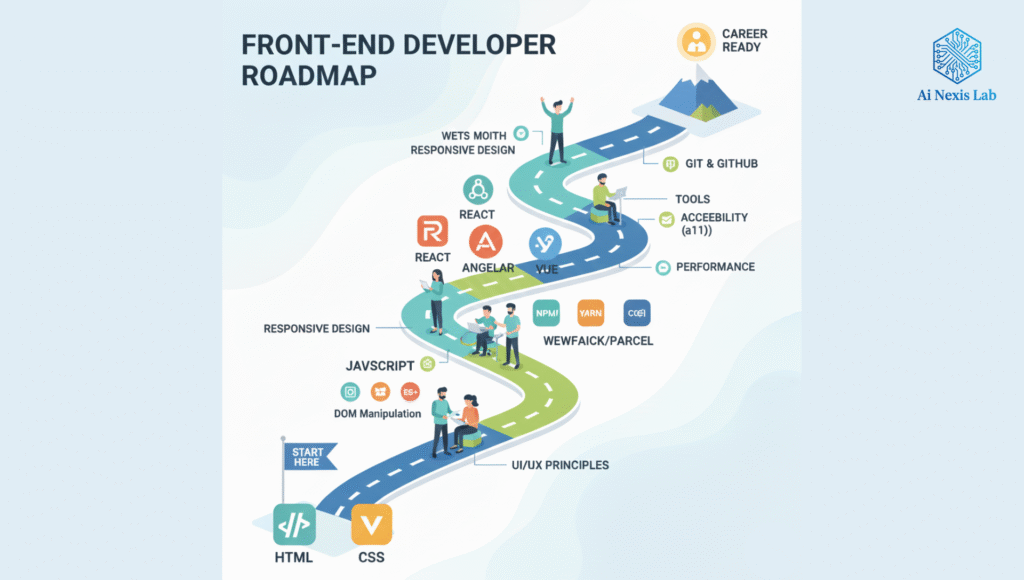
A beginner’s roadmap to getting started with front-end development
Follow this simple path:
- Learn HTML
- Learn CSS
- Practice Responsive Design
- Learn Basic JavaScript
- Create Mini Projects (Landing Pages, Forms, To-Do Apps)
- Learn Frameworks (React Recommended)
- Learn Git & GitHub
- Create a Portfolio
- Apply for Internships / Freelance Gigs
Stick to this and you will grow quickly.
FAQs about front-end development
Q1: Do I need coding experience?
A: No. The front-end is beginner-friendly.
Q2: Can I get a job without a degree?
A: Yes. Skills > Degree in front-end.
Q3: How much math do I need?
A: Almost none. Logic is more important.
Q4: Is React mandatory?
A: Not mandatory, but highly recommended.
Q5: Can I learn front-end using only YouTube?
A: Yes, but structured practice is key.
Conclusion: Start your front-end journey today
Front-end development is powerful, creative, and opens the door to endless opportunities – blogging, freelancing, tech jobs, and even entrepreneurship.
Whether you want to create your own blog or start a full-fledged tech career, understanding front-end development is a great place to start.