120 Minute Thief: How I Got My Morning Back with 3 Stealthy Chrome Extensions
Discover 3 game-changing AI workflow tools that eliminate tab overload, speed up email writing, and reclaim 2 hours of deep focus daily.
There’s a certain kind of depression that comes around 10:17 AM.
You started the day off strong. The coffee is hot. It’s quiet. You tell yourself, I’m really going to make progress today.
Then you open your browser.
Thirty tabs. A pile of email notifications. A quick Google search that turns into a rabbit hole. A YouTube explanation you need to “watch.” When you look up again, it’s almost noon.
You have been busy for two hours straight.
You haven’t produced anything.
This is not about willpower. It’s not about waking up early or buying a standing desk. It’s structural. The modern browser was not designed for deep work in 2026. It was designed for consumption.
And if you’re running a company, freelancing, creating content, or managing clients, that friction increases quickly.
Let’s do some simple math.
Two hours a weekday × 5 days × 52 weeks = 520 hours a year.
That’s 65 full 8-hour workdays.
That’s more than two months of your life.
I stopped accepting it as “normal.” I started treating the browser as a broken system that needed an upgrade.
Here’s a deep dive into three AI-powered Chrome extensions that drained my two-hour morning:
We’re not talking about hype tools. We are talking about leverage.
Table of Contents
Anatomy of a Two-Hour Sinkhole
Before we talk about tools, let’s break down the real problem.
Context Switching Tax
You don’t lose two hours on a major incident.
You lose them in micro-fractures.
- Check Email
- Reply
- Go to Research
- Back to Inbox
- Ping Slack
- Back to Dock
- Open three “quick” tabs
Research over the past decade (including multiple cognitive performance studies) consistently shows that it can take 15-25 minutes to regain full attention after a distraction. Even though you think you “bounce back quickly,” your brain doesn’t.
If you interrupt yourself every 10 minutes, you never get into deep work.
You live in a permanent state of shallowness.
That’s the tax.
Decision Fatigue Trap
Every email requires micro-decisions:
- Tone?
- Length?
- Formal or casual?
- Attach something?
- Suggest a call?
By 11am, if you have processed 30-40 emails, your cognitive energy is depleted. Not because the tasks were difficult – but because they were repetitive.
Decision fatigue is real. It reduces clarity, increases impulsive choices, and kills creativity.
The browser exacerbates this problem because it gives you infinite inputs and zero structure.
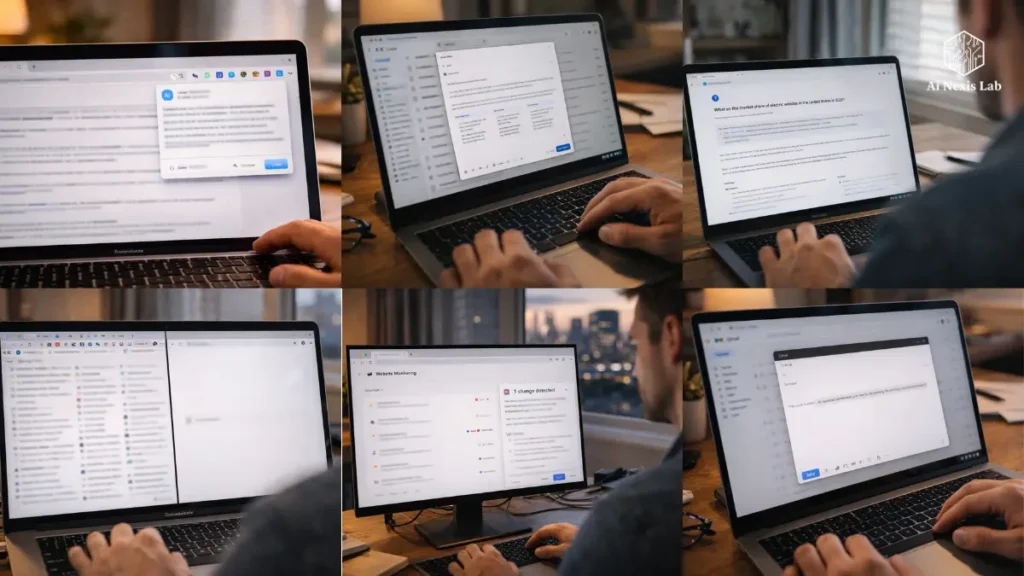
Extension #1: Compose AI – The End of Manual Email Writing
If you’re still typing every email from scratch in 2026, you’re choosing friction.
Compose AI is not a typical template engine. It’s predictive writing that adapts to your tone over time.
How it actually works
In Gmail or most web text fields:
- You type
/ - Add a short objective like:
Decline politely next month - It generates perfect responses based on the email context.
No canned garbage. Context-aware drafts.
Example:
A client sends a long request asking for scope creep outside of the contract.
Instead of spending 8 minutes making a diplomatic number, you:
- Trigger Compose.
- Choose a tone: professional / friendly / concise.
- Edit lightly.
- Send.
Time spent: less than 90 seconds.
Why Is It Different From Templates
Templates are static.
Compose AI is adaptive.
If you consistently sign off like this:
“Cheers – let’s reconnect on Tuesday.”
It learns.
After writing “Ch…”, he completes the sentence.
It’s not flashy. It’s compounding functionality.
Rephrase Weapon
Underrated feature? Rephrase.
Highlight something:
“This request is outside our scope of agreement.”
Click on Rephrase.
He softens it down to something like this:
“This falls a little outside our current scope – we’re happy to discuss how we can accommodate.”
It’s a feature that prevents tone mistakes that cost relationships.
Actual Time Savings (2026 Usage Pattern)
If you send:
- 25 emails/day
- Save 1.5 minutes per email
That’s ~37 minutes/day.
Multiply that by one year:
Over 150 hours saved.
And that’s conservative.
Extension #2: Perplexity AI – Search and Click Cycle Killer
Google gives you links.
Confusion gives you answers.
That difference changes everything.
Tab Labyrinth Problem
You search for:
“2026 US EV Market Share Statistics”
You open:
Now you have:
4 tabs open
3 Avoiding ads
2 Conflicting statistics
1 Growing headache
Perplexity Way
Click on the extension.
Ask a question.
You get:
- A Summarized Answer
- Cited sources
- Follow-up clarification options
Time: 30-45 seconds.
Zero new tabs.
2026 Reality: Research Is Slower Than It Used to Be
Content creators, founders, and marketers are drowning in research demands.
But most of the time there is no analysis.
That’s navigation.
Confusion breaks down navigation into synthesis.
Follow-Up Power Move
Ask:
“What is the projected US EV share for 2027?”
Then:
“What federal incentives influenced it?”
You don’t leave the interface.
It threads the context.
This way you avoid 12 open tabs.
Extension #3: HARPA AI – Web Automation Swiss Army Knife
If Compose writes and Perplexity researches, HARPA implements.
This tool is currently the most underrated productivity multiplier.
Website Monitoring
Waiting for:
- Software Discounts?
- Course enrollment openings?
- Product restocks?
Instead of manually checking every day:
HARPA monitors the page and alerts you when changes occur.
It’s not just a convenience.
That mental bandwidth has been reclaimed.
YouTube Summaries
We’ve all been sent:
“Watch this 22-minute explainer.”
At most, there could be 5 bullet points.
HARPA can immediately summarize the transcript.
That’s what saves:
30-60 minutes per week.
That’s 25+ hours a year.
On-Page AI Commands
HARPA can analyze the page you’re on.
Examples:
- Summarize an article
- Extract bullet points
- Generate responses based on page content
- Compare price levels
It interacts with the live web.
There automation changes from helpful to powerful.
Solving The “Tab Overload” Culture
You don’t keep tabs open because you’re messy.
You keep them open because you are afraid.
There is a fear of being forgotten.
There is a fear of being forgotten.
You will need it later.
There is a fear of losing context.
Every open tab becomes an open loop in your brain.
An open loop creates a low level of anxiety.
Correction
- Use HARPA to summarize.
- Copy the summary into Notion or your Notes app.
- Close the tab.
You are not losing information.
You are narrowing it down.
That is cognitive clarity.
Feature Comparison Segmentation
| Feature | Compose AI | Perplexity AI | HARPA AI |
|---|---|---|---|
| Primary Goal | Writing speed | Instant research | Automation & monitoring |
| Best Use Case | Email, Slack | Market data, stats | Video summaries, tracking |
| Daily Time Saved | ~30–45 min | ~20–30 min | ~30–45 min |
| Learning Curve | Very low | Low | Moderate |
Combined?
Are you realistically getting 90-120 minutes of use out of your day?
Common Pitfalls: When AI Becomes a Disruption
Let’s be clear.
You can waste three hours “optimizing” AI tools.
That’s productivity cosplay.
The Trap: Perfect Prompt Syndrome
Spending 10 minutes creating the perfect AI instruction to save 2 minutes of typing.
That math doesn’t work.
Fix
- If a prompt takes more than 30 seconds to write, stop.
- Use AI for the first draft.
- Finish manually.
AI should remove friction – not create new complexity.
The Future: Towards the Headless Browser Era
We are moving away from browsing and towards commanding.
Instead of:
“Let me open 7 tabs and collect information.”
It becomes:
“Summarize, compare, monitor, draft.”
That change is important.
Because when you eliminate two hours of shallow work every day, you don’t just get faster.
You get more strategic.
You think for a long time.
You do better work.
Or you quit sooner.
Both are upgrades.
Frequently Asked Questions
Are these extensions reading my private data?
Most AI-powered extensions process content to generate output. In 2026, major tools like Compose AI and Perplexity offer opt-out options for data training and privacy controls in settings.
However, you need to:
1) Review the permissions.
2) Disable data-sharing toggles when handling sensitive client information.
3) Avoid using AI tools for regulated industries without compliance checks.
If you deal with healthcare, financial, or legal data, check policies carefully.
Convenience is not an excuse for negligence.
Does using AI for emails make me look lazy?
Only if you allow it.
Clients don’t care how you draft.
They care about:
1) Clarity
2) Speed
3) Accuracy
4) Professional tone
If AI helps you respond faster and better, it’s a competency.
But if you blindly copy-paste and miss subtleties, that’s negligence.
AI is a drafting tool – not a substitute for decision-making.
Do I need a paid plan?
Free tiers are strong in 2026.
Both Compose AI and HARPA offer free versions useful for light to moderate users.
The free version of Perplexity works well for quick research, but power users often benefit from paid models for deeper queries.
Start for free.
Only upgrade if your daily workflow proves the ROI.
Will this work on mobile?
Not good.
Chrome extensions are desktop-native tools.
On mobile:
1) Use dedicated apps.
2) Accept lower capacity.
3) Or avoid heavy production tasks altogether.
Mobile is for communication.
Desktop is for creation.
Can I use all three together?
Yes – and that’s the point.
Workflow example:
1) Collects confusing data.
2) HARPA provides a summary of supporting materials.
3) Compose creates a draft of an outbound email.
They do not contradict.
They combine.
Final Verdict
A loss of two hours is not laziness.
That is architecture.
The browser was designed for consumption, not for controlled implementation.
By layering:
You’re not just adding tools.
You are installing the cognitive upgrade layer.
Stop treating wasted mornings as personality flaws.
Fix the system.
Reclaim the hours.
Then decide what to do with them.
That’s leverage.